Apr 16, 2020 12:30 PM UTC
Delivered

Fix Import STEP Assembly as Part - Components in Wrong Position

Related products:Creo Parametric

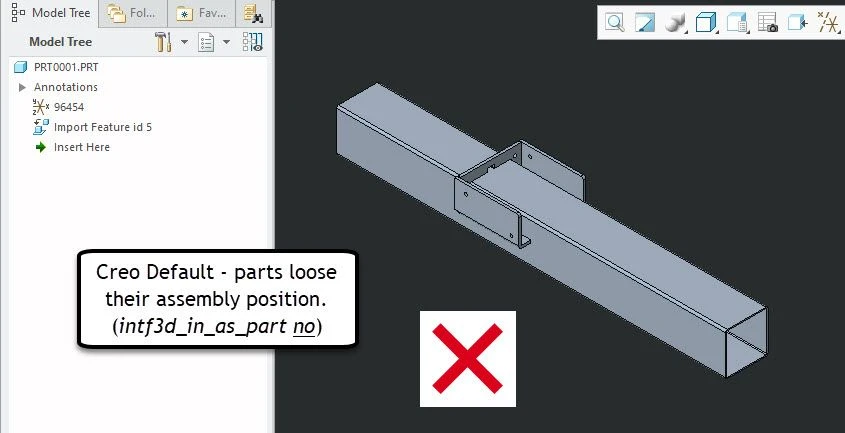
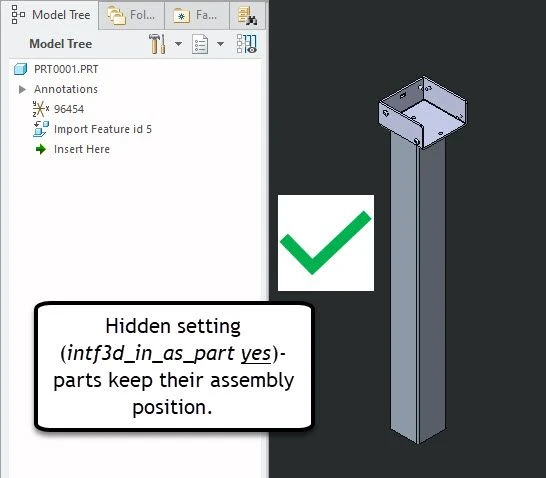
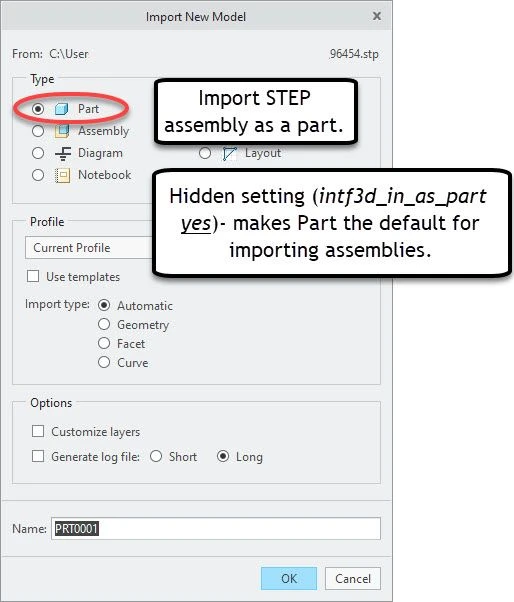
It's common to import supplier CAD assemblies as a part to only manage one object in Creo/Windchill. In Creo 4 M090 and Creo 6.0.2.0, the default for importing STEP assemblies as a part results in the components coming in the wrong position. I opened a case with PTC... apparently there's a hidden Creo config setting intf3d_in_as_part yes to fix this as discussed in CS10021 but this setting also changes the default selection to import as part at the same time. PTC Support suggested creating a product idea.


As Creo 7 now supports multiple bodies for parts, it would be nice if we could easily import STEP assembly components as a part 'body' AND get the components in the correct position (haven't tried Creo 7 yet since it came out yesterday).


Please fix:

  • With intf3d_in_as_part no (the default), selecting import STEP assembly as part should import the parts in the correct assembly position.
  • intf3d_in_as_part should only change which box is checked by default and should NOT be a hidden setting.
Creo Import Assembly as Part - 1.jpg

Creo Import Assembly as Part - 2.jpg

Creo Import Assembly as Part - 3.jpg

5 replies

Oct 18, 2022 4:15 PM UTC

lhoogeveen

I agree I've used this option for years and it is so useful when you want to store an assembly model as a single part.  Supplier parts especially.  I really feel that this should be standard, but I cannot remember if there was a reason that this option is not default behavior.  In any case I would prefer it be in the import menu and not a hidden configuration option.

Oct 18, 2022 4:24 PM UTC

There are certain conditions where intf3d_in_as_part yes does not work correctly.  It was never finalized and made 'production ready', so the config option to enable it has remained hidden (use at your own risk).  There is work going on to make importing an assembly to a multi-body part fully supported and automatic.


One example where intf3d_in_as_part does not work correctly is when the assembly being imported has components with mixed units.  When the assembly is imported into an inch part, any metric components will be scaled up having their mm values treated as inch values, effectively making the models huge.

Community Manager
Feb 12, 2025 10:20 AM UTC
Status changed to: Acknowledged

Hello,

Thank you for your idea. Based on the details and popularity of your idea, we are acknowledging it as the Community management team. This is not a commitment from the Product team.

Mar 17, 2025 1:33 PM UTC
Status changed to: Delivered

Hi all,


This Community Idea has been implemented into Creo 12 and will be delivered in the coming release of Creo 12.4.0.0 (May 2025)


Enhanced import support for STEP files in Creo

  • Creo has improved the behavior when importing STEP files in Creo
    • Upon importing a STEP file, Creo will determine the appropriate model type for the import file (Part or Assembly)
      • STEP Assembly – the default model type will be set to assembly; however, users will be to change the type to part.
        • When the model type is set to assembly, a new Creo assembly will be created with the defined assembly structure and components displayed in the graphics window and listed in the Model Tree
        • If the user chooses the model type as part, a new Creo multibody part will be created with a defined body for each assembly component
        • A new config option has been created to control the default model type - step_assembly_import_type = assembly (default)/part
      • STEP Part – the default model type will be set to part.  The Assembly type will be grayed out unless the STEP part file is a multibody part.
        • If the STEP part is a multibody part, the default model type will be an assembly and will be explode the bodies into a flat subassembly structure within the assembly
        • If the user chooses the model type as part, the multibody STEP part will be imported as a true multibody part
        • A new config option has been created to control the model type for a multibody STEP part - step_multibody_part_import_type = assembly (default)/part
    • STEP assemblies containing multi-body parts can now be maintained  through a new STEP import profile option under the Topology tab called ‘Maintain multibody structure of assembly components’
      • When checked, multibody components defined in the STEP assembly will be imported as multibody components when model type is set to assembly
      • When unchecked, multibody parts will be exploded into flat subassemblies within the assembly
      • Either through a STEP import profile or during the import operation, users will be able to change this option to control their import preference
    • To preserve past behavior, a new import option has been defined enabling users to add the import model to a new Creo assembly
      • This option is disabled by default, but users will be able to set this in the STEP import profile or during the import operation to enable the import model to be a component or subassembly of a new Creo assembly
      • A new config option has been created to control this option - step_add_import_model_to_asm = yes/no (default)
  • Benefits:
    • Improved behavior when importing STEP file into Creo and allowing users to control their import preferences to achieve the desired file structure
    • Allows users to preserve STEP Assembly and Part containing multibodies during import
    • Improves interoperability between different CAD systems and Creo when using STEP
Mar 21, 2025 2:28 PM UTC

@mfischer Thanks!!