
[Eztol] Modify arrow size and type - more customized requirement in Eztol
1. What version of the software are you running?
Creo 7.0.3 upgrade to Creo 7.0.10
2. What is the problem?
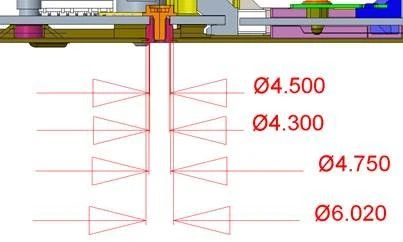
Although we can modify text height by setting “TEXT_HEIGHT_FACTOR”, but we find we can’t adjust the size and type of arrows size as below picture shown. Arrow size is looked bigger than dimension text.
3. Are you using a workaround? If yes, please describe it.
No.
4. What is the use case for your organization? Describe how your idea would work in context or how it would apply to a practical situation.
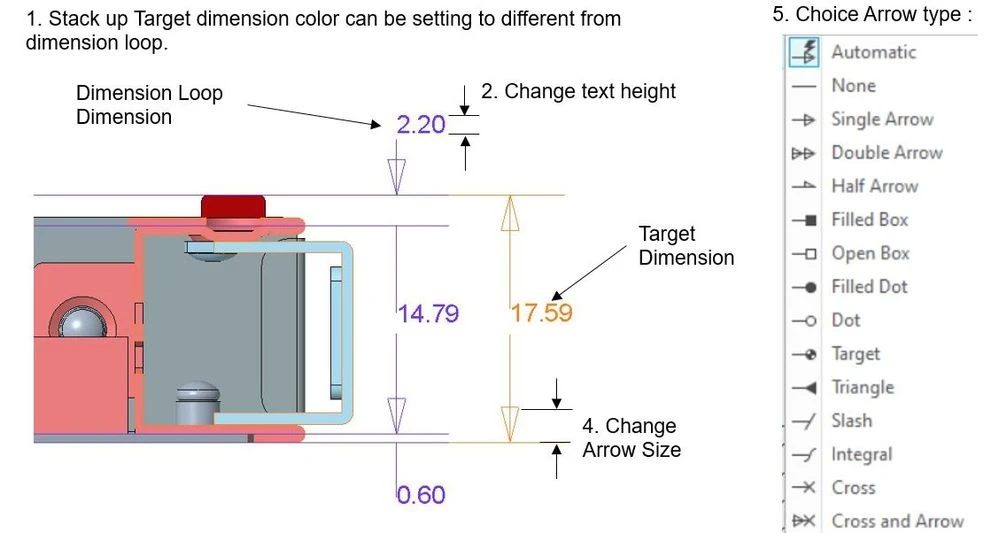
We suggest we can have more customized option in Eztol :
1.Define Color : Target and Dimension
2.Dimension text size
3.Dimension value hide and un-hide
4.Arrow Size
5.Arrow Type
5. What impact does this problem currently have on your organization? (Number of users affected, hours of lost productivity, etc.)
Arrow type and size can't be modified to make Customers dis-like. And Dimension text height only can be adjusted by “TEXT_HEIGHT_FACTOR” to impact user experience. we hope more customized option to push Customers to accept to use EZTol more easily. And we can improve RD efficiency.