
Nov 11, 2014 10:36 AM UTC
Acknowledged

explode state line - same display in shading mode

Related products:Creo Parametric

If you create a shaded view with an explode state, you can see the line cross over the part.
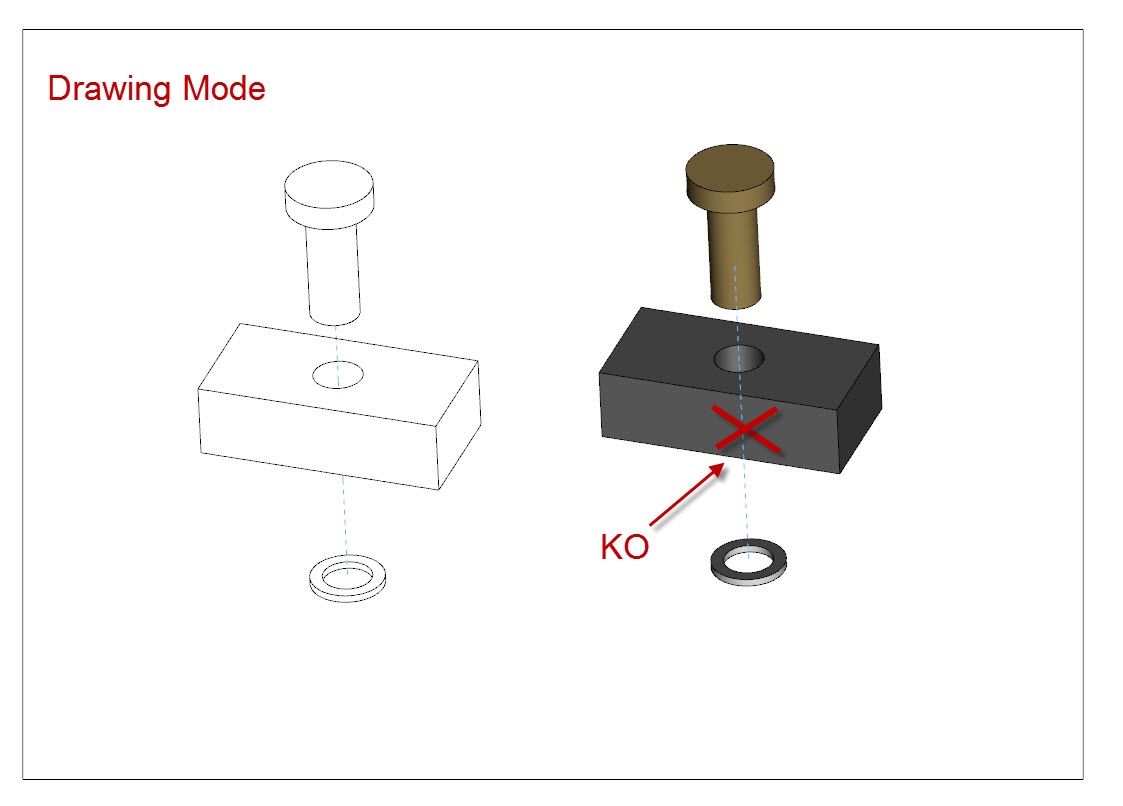
Exemple Simple.jpg

It's not realist and not the same result that if you use a hidden style view or in 3D (assembly mode)

Eclaté simple dans Creo.jpg

11 replies

Nov 11, 2014 8:03 PM UTC

I find this to be a huge oversight in the specification for explode extension lines.  I have developed a Pro|WorkAround^tm that works well, but it is a lot of extra work for something that should be a given.

1st, put all the extension lines on a layer.

2nd, create a shaded (not shaded with edges) view on your drawing.

...2a create a origin feature in the view.  A datum point is easier to manage.  You need this in case the extension lines creates a different view center origin.  Place the view at a simple to reproduce origin coordinates.

3rd, hide the layer on which the extension lines exist for that view only.

4th, create a no-hidden line view exactly the same as the shaded view.

...4a place the view according to the same origin as the shaded view and position the view origin in the same location.

You now have a shaded view without the extension lines and a no-hidden view that properly hides (HLR) the extension lines overlaying each other.

extension_workaround.PNG

fmarinierAuthor
Nov 12, 2014 1:36 PM UTC

Hi,

Thanks for the tips.

this is a workaround for full view but with a Visibility set on Partial View it 's difficult to have the same Spline Boundary like in this exemple.

A Native ans supported solution is my dream ...

Boundary.jpg

Nov 12, 2014 7:27 PM UTC

Yep, fixing the problem would be terrific   Again, I don't know how this ever passed QC or how the performance specification was considered acceptable.

You can make the broken section using points as guides and get pretty close for matching.  Again, it is painful.  And if you look carefully (even the native single view version; shaded with edges), the alignment of the edges is not perfect to the shaded image... not even close, due to faceting of the shaded view.

Oct 26, 2017 3:59 PM UTC

Yep, fixing the bug should be a priority, simply calling it unsupported is a poor excuse for bad code.

Your fix is very clever but doing the work twice seems expensive just to work around a code bug.

Maybe just export your model in exploded state and let SW handle it from there - Come on PTC don't make me go there!

Jun 14, 2018 7:11 PM UTC
Status changed to: Acknowledged
Feb 9, 2022 10:40 AM UTC

This is solved for at least from version 7.0.5.0.

olivierlp
Community Manager
Feb 10, 2022 12:29 PM UTC

From a quick check with a product manager, this appears not to be fixed yet.  

Olivier
May 16, 2024 7:31 PM UTC

Not fixed in Creo 9.0.6.0.  We put in a case, it was acknowledged as still an issue and we were directed here.

Jan 14, 2026 1:41 PM UTC

I need to check on Creo 12, but I'm not sure if it's been fixed so I'm asking PTC if it's coming to Creo 13?

Jan 14, 2026 2:35 PM UTC

As of 13.1 (Creo+) it is still an issue.