
Enhanced merge feature in Creo with inbuilt tolerance setting
1. Describe the Problem
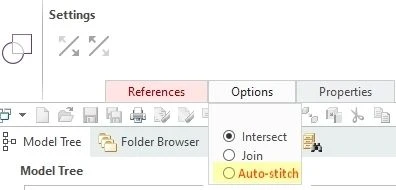
Oftentimes, especially when working on models partially derived from imported geometries, it takes a lot of effort and time to obtain a closed quilt that can be solidified. A suggested improvement is to include a third option in the merge feature (or create a separated “approximate merge” feature, if preferable): this option could be named Auto-stitch or similar naming.
If the user selects the Auto-stitch function, a “tolerance” field is activated, where the user can select any value greater than the model Accuracy.
Possible implementation:
First attempt: the software extends (Same/Tangent/Approximate) both sides of the open gap + merge
Second attempt: if the neighboring patches cannot be extended, a tiny surface is created (e.g. Boundary Blend) that fills the gap (preferably with tangent-tangent boundary conditions; free-tangent or free-free would be acceptable in the worst case scenario)
On a side note, the Creo Import Data Doctor has some tools that allow to obtain approximately this result. However, having an ordinary feature outside of IDD would be hugely beneficial, when additional features are required after the “Import” feature that can be edited with IDD. Sometimes it is simply necessary to add features outside of IDD, which would make an “enhanced merge” a significant improvement.
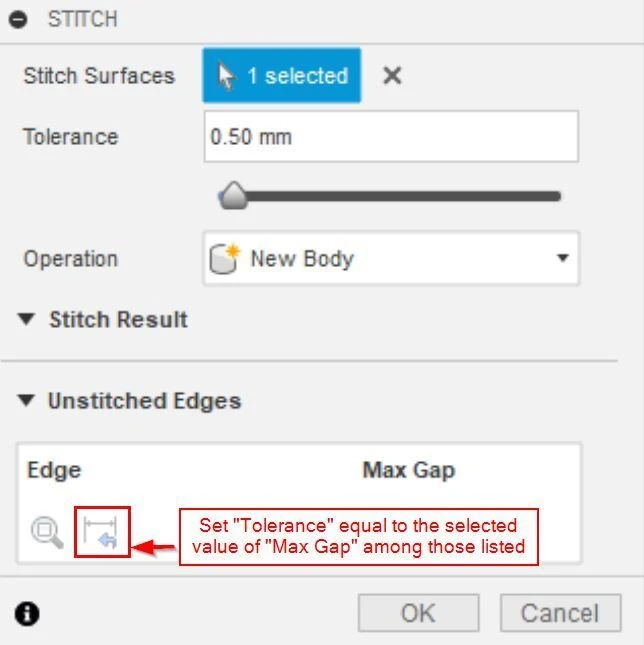
Siemens NX and Catia V5 have features with this kind of option (named Sew and Join, respectively). Moreover, Autodesk Fusion has a Stitch feature, which has a nice-to-have additional menu: the list of open gaps is displayed, in ascending order, and the user can specify to set the Stitch tolerance equal to the size of one of the listed gaps. This allows to save time in trial-and-error iterations playing with the tolerance value [see attached Screenshot no. 3].
Business value
An improved merge feature would speed up the design process and subsequent model checks: solids typically make clearance checks faster and allow to evaluate mass properties, among other benefits.
Attached files:
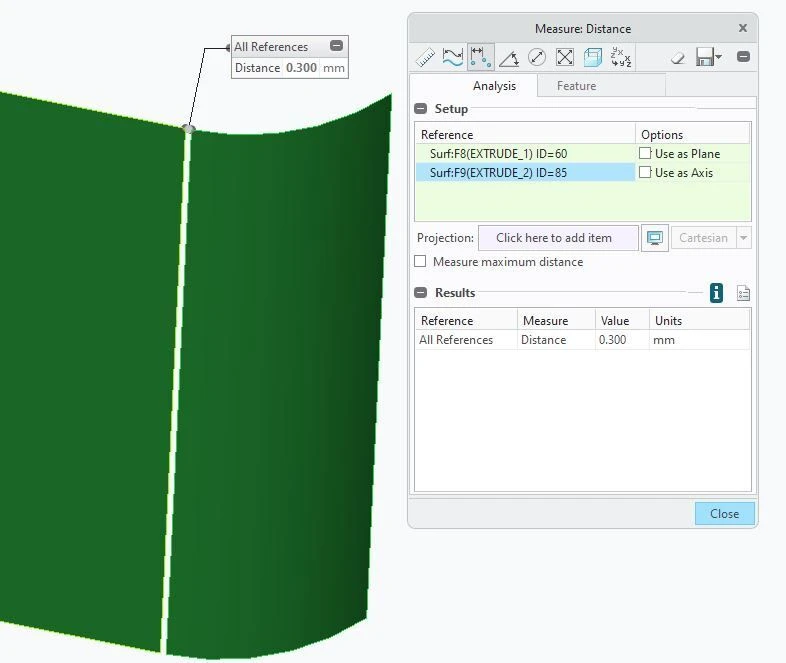
The first picture shows two quilts (very simple geometry) that are separated by a 0.3 mm gap. The second picture is a suggested way of allowing users to select the enhanced merge (if keeping it as an “option of an existing feature” is preferable). The expectation in this case is to obtain a single merged quilt if the user selects Auto-stitch and enters a value at least equal to 0.3 mm. The third picture refers to Stitch feature of Fusion.
2. Are you using a workaround?
Currently using external software (e.g. Autodesk Fusion) and reimporting Step files in Creo, to be further processed where patches are still disconnected. Sometimes, it's possible to apply a quick fix in Creo with "Remove" (leave open setting, keeping the removed surface) and subsequent "Merge" (join option).
3. What is the use case for your organization?
Design of toolings referencing imported models (e.g. STEP files). A second scenario might be a concept design phase, where obtaining an approximate solid model would be totally acceptable if it can shorten the time needed, compared to using the currently available surfacing features.
4. What impact does this problem currently have on your organization?
On complex models, it's either necessary to spend time in fixing individual surfaces or simply accept that such model won't be solidified (not ideal, but acceptable if the model is only assembled for visual purposes or if it's enough to solidify a "partial copy" of it).