
Acknowledged
Enhance the creo_parametric_customization.ui to include more standard icons - example "expand all"
Please include detailed documentation such as screenshots, images or video.
1. What product and version are you running?
- Creo Parametric 9.0.6.0 connected to Windchill 12.
2. What is the problem?
- With Extremely Large Assemblies, the expand all button in the ribbon must not be used as it induces a download of the entire structure into the workspace with a resulting very large cache (+100GB). We would like to find a way to hide this icon in user interface.
- It would be nice to enable all the icons in this area of the Creo interface to be customizable for the user to hide/turn on.
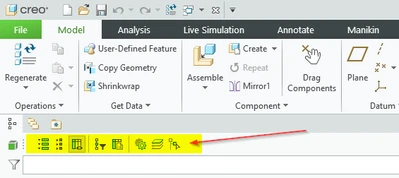
3. Are you using a workaround? If yes, please describe it. - There is no workaround except hope the user does not select this when working with a large assembly that depends on simplified reps
4. What is the use case for your organization? Describe how your idea would work in context or how it would apply to a practical situation. - Not having this icon viewable would prevent the user from making the easy mistake of clicking on this icon which will result in the user needing to end the Creo application using the task manager.
5. What impact does this problem currently have on your organization? (Number of users affected, hours of lost productivity, etc.) - Calculation - 1400 Creo users in our organization. 1000 of them use master models. 50% of the users accidentally hit this button. From our experience, it is 8 hours for users to clean and and get back to a high performing workspace. 500 work days of lost time or $400,000.($100/hr)
- Note: It would be beneficial for many companies / users to have the ability to hide/unhide this ribbon area or buttons