
Jul 27, 2015 9:33 AM UTC
Acknowledged

Enable Performance Advisor to show the real Login Name and Host Name of sessions instead of the masked data currently available

Related products:Creo Parametric

Idea

Enable Performance Advisor to show the real Login Name and Host Name of sessions instead of the masked data currently available.


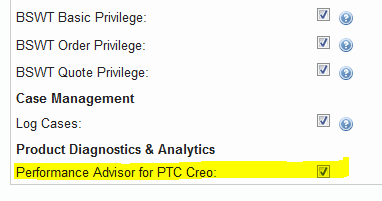
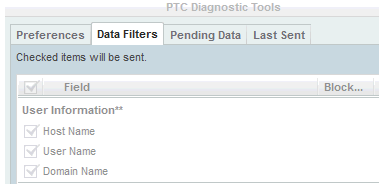
This should be configured for users with proper privileges, assigned through the eSupport Account Privileges for Performance Advisor for PTC Creo, and if this data have been willingly sent in unencoded form for that purpose by configuring the "PTC Diagnostic Tools" data filters:


Background

There is no easy way to find out the correlation between the masked data "User_ID" and "UUID" and their counterpart like User Name and Host Name even if this data have been willingly sent in unencoded form for that purpose by configuring the "PTC Diagnostic Tools" data filters.

Therefore the Performance Advisor, a tool that would be really useful, loses a great part of its effectiveness because of difficulties needed to identify quickly in the dashboard the failing sessions using masked data instead of actual User Name/Host Name and the work needed to maintain those mappings up to date.

In a company with a lot of users and workstations those difficulties, and the overload required, make this tool useless.

47 replies

Oct 26, 2015 5:33 PM UTC

Ah yes, I missed that.  I think by the time I read the incorrect statements about there being no easy way to find match the User ID and UUID my mind had moved on.  Perhaps it is a matter of what each person describes as 'easy'.  I would disagree with the statement that the lack of immediately visible user id's makes the tool 'totally useless'.  I would agree that the information about the PTC Diagnostic Tools should be included in the FAQ - Performance Advisor for PTC Creo.

I agree in the screen capture Tom shows that it would appear they can be checked to be sent, and it would be confusing to still see hashed (encoded) user id's and UUID's in the dashboard.

Perhaps software development put it in, but once the lawyers reviewed it it was pulled out?  I notice by default it's off with our installation of Creo 2 M180, but User ID's and UUID's are still visible in hashed form on our Dashboard.

Aside: I think I'm becoming a bit sensitive to all the negativity put forth as product ideas or included in product ideas when people just need to do their homework and dig a little.  Sure we don't want to have to dig, but when was the last time any of us communicated something deep and complicated and it was understood by our users on the first time they read it?

- Jim

Oct 26, 2015 5:52 PM UTC

Just to clarify, the user and machine unique identifiers (UID/UUID) are always sent to PTC.  If you've agreed to allow diagnostic logging, then there is no way to prevent this.  Fundamentally it's the "key" - the thing that allows the data to be uniquely identified and categorized.  What PTC is currently blocking is the ability to upload the associated user and computer identifying information.  Having this information visible in the dashboard (along with geographical information) will make the tool much more useful.

1-Visitor
Feb 19, 2016 12:59 PM UTC

I've thought that a possible workaround to identify user/machine could be the use of MAC Address.

We have a DB where users, computers name and MAC Address are joined (this is possible following ITIL rules and using a dedicated SW)

Dan Nowitz‌ could this information be added to xml files sent to PTC, and to System Information properties on the dashboard, waiting for the implementation of this idea?

Thanks

Mar 9, 2016 7:37 PM UTC

Quick update.  PTC is now acknowledging that if these boxes are checked, the data IS sent to PTC, but they currently don't use it for anything.

See updated article CS223534 for more info.

1-Visitor
Apr 1, 2016 10:34 AM UTC

In the help center of Performance Advisor for Windchill you can find this phrase:

Server Name––The server GUID can be quite long. You can provide a name for the GUIDs for easy identification. Type a name in the Server Name field and press ENTER or click outside the field. The server name is updated and reflects on all pages and Windchill Server list. Each server should have a unique name.

Why PTC gives us the choice to change server name and doesn't do the same for workstations?

P.S. at the moment it's only written in the help center because it doesn't work.

Apr 1, 2016 3:48 PM UTC

I just verified with support.  This extra, nameable field will be live on Monday.  (The documentation got ahead of the release.)

1-Visitor
Apr 1, 2016 3:51 PM UTC

Thanks for your info Tom.

Apr 1, 2016 3:57 PM UTC

I also asked if there were planning to add the same capability to user and host GUIDs on the Creo side.  They said it's a good idea, but not currently planned.  Maybe someone should create a separate product idea.  Still not quite as nice as this idea, but better than nothing.

May 18, 2016 11:55 AM UTC

All


the requirement to display user and machine name is fully understood.  My hands are tied with European, US and Asian laws and the only way around the legal minefield is to provide an on site collector which will allow companies to internally display the user information.  It will then be the responsibility of each company to comply with the law in their respected country.  I hope to be able to provide an onsite collector in late 2017

thanks, Jim

1-Visitor
May 18, 2016 1:16 PM UTC

Jim,

thanks for your update, but I'd like to inform you that PA for Creo behavior it's steadily and strongly worsening from several weeks.

I have, at the moment, 7 opened cases awaiting SPR resolution.

For example it's since two weeks that all my sessions were duplicated in my dashboard and I'm sure at least a couple of other companies have same issue.

https://support.ptc.com/apps/case_logger_viewer/auth/ssl/case=13026788

Another case is opened since last November, because not all sent sessions are loaded in the dashboard

https://support.ptc.com/apps/case_logger_viewer/auth/ssl/case=12837883

https://support.ptc.com/apps/case_logger_viewer/auth/ssl/case=12799022

This case is also from last November and it drives me crazy because of case sensitive creation of UID.

This behavior causes the creation of different UID for the same user depending on how he enter his name.

https://support.ptc.com/apps/case_logger_viewer/auth/ssl/case=12828038