
Archived
Enable ordinate dimensions of automatic sheetmetal bounding box
The automatic bounding box dimensions displayed on a drawing of a sheetmetal flat (see below) are handy - unless the company drawing standards dictate ordinate dimensions on flat views.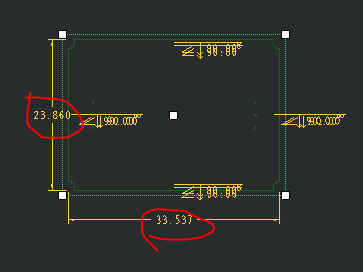
These dimensions cannot be converted to ordinate and there is no setting that will prevent them from displaying automatically.
The dimensions must be erased and new ordinate dimensions must be created in their place.
Recommendations
1. Allow these dimensions to be converted from linear to ordinate, or
2. Provide a config option or drawing option that can turn off these dimensions to eliminate the extra step of having to erase them.