
Enable Editing of Component References in the Reference Viewer
1. Describe the Problem
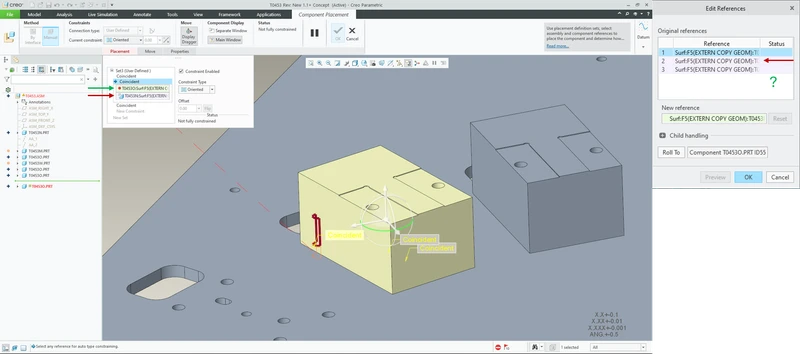
Currently in Creo Parametric, the Reference Viewer (Edit References dialog) only allows users to view and edit Assembly References; it does not allow editing the Component References
This means that when a user wants to change the references a component is constrained to, they must open Edit Definition for each part individually, locate the relevant constraint(s), and manually replace the references one at a time.
2. Are you using a workaround?
The current workaround is to use the Edit Definition dialog for each component individually, manually rerouting its placement (Component) references through the Placement tab. While functional, this method is extremely time-consuming when working with large assemblies and does not support bulk editing.
3. What is the use case for your organization?
Allowing both Assembly References and Component References to be edited in the Reference Viewer would enable bulk editing of placement constraints, allowing users to quickly reroute references across multiple components without opening each one individually.
4. What impact does this problem currently have on your organization?
Makes it difficult to edit references in large assemblies.