
Apr 4, 2019 9:33 AM UTC
Archived

DXF SCALE UNIT CONVERSION

Related products:Creo Parametric

Creo 4.0 now reads the unit of imported DXF files in 3D models (defined by value of  $INSUNITS)

So if the DXF unit is not the same as your part setup, the geometry is wrongly scaled.

Unknown problem in previous releases...

PTC workaround is to edit the DXF file to change the $INSUNITS value.
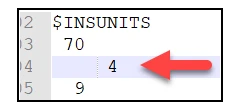
INSUNIT.png

Not acceptable for users in 2019.

Please provide import conversion functionality for this case, as it exist in other softwares...
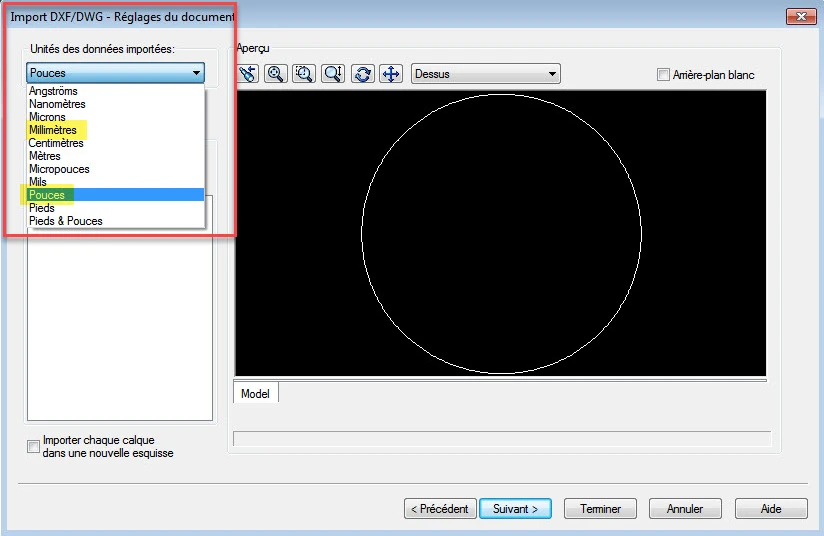
 

dxf_import_conversion_units.png


Thanks.

3 replies

Apr 4, 2019 1:37 PM UTC

2019-04-04_15-35-46.jpg


Hi,

We have this issue since we use Creo4 and Adobe Illustrator.

With Creo3 it was OK.

I opend an idea on Adobe forum:

https://illustrator.uservoice.com/forums/601447-illustrator-bugs/suggestions/36968350-unit-issue-with-dxf-exported-from-illustrator


Apr 4, 2019 1:55 PM UTC

SolidWorks offers the choice of units:


SW units.jpg


olivierlp
Community Manager
Jul 5, 2023 2:59 PM UTC
Status changed to: Archived

Hello,

We are archiving your idea as part of a general review. This action is based on the age of your idea and the total number of votes received, as per this announcement.

You can always post a new idea with all the details required in the form.

Thank you for your participation.

Olivier