
Dual dimensions (or multiple dimensions) in Measure tool
1. Describe the Problem
I would like the Measurement tool to be able to display multiple units at the same time. For me this almost exclusively applies to IN & mm, but some people like to work in IN & FT, or IN & CM, etc. As shown in the picture below, I suggest augmenting the current Units option with check marks to generate a list of measurements. In my case, that would be 2 measurements, but it could be more depending on the use case. Being able to specify precision (# of decimal places) is also useful for reducing visual clutter.
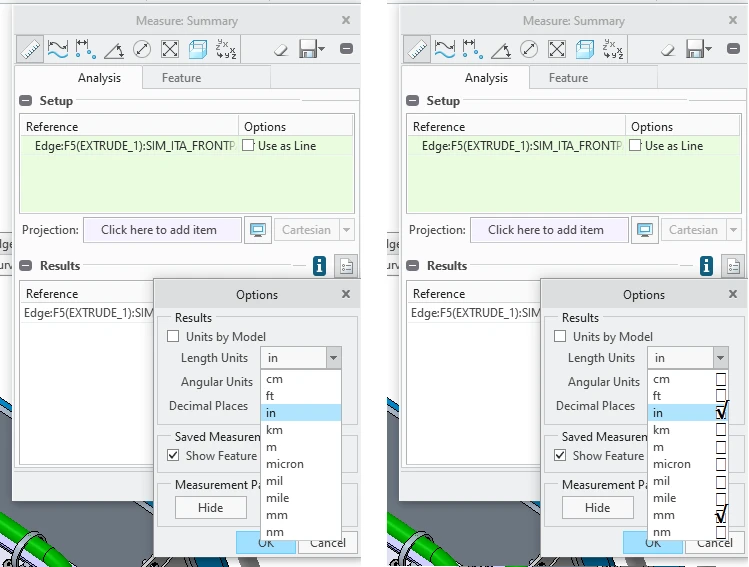 Suggested Measure Tool Improvement
2. Are you using a workaround?
Currently I take a measurement, then click Options, then click Units, then scroll & click on mm, then click Okay. This isn't a workaround, but it is 4 extra clicks and some visual searching that has to be done multiple times in a given part. Depending on the number of metric parts in the assembly, sometimes I change the units of the assembly to metric, work on those parts, then change the units back to inches. Neither of these are good workflows.
3. What is the use case for your organization?
We work frequently with COTS parts within a custom enclosure. This necessitates using Imperial and Metric measurements within an assembly. Checking measurements from multiple files means doing a lot of switching back & forth. This happens on nearly every assembly we make.
4. What impact does this problem currently have on your organization?
We have almost 40,000 employees, and probably 5,000 of them are CREO users. Saving 10 seconds per model thousands of times per day is significant savings.