
Drawings: Prevent hidden surface preselection
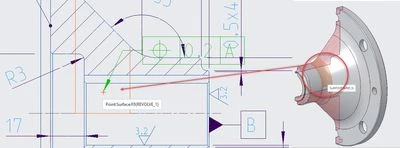
In drawings, when placing annotations, hidden surfaces can appear selectable on the model.
Hidden lines can be turned off with : select_hidden_edges_in_dwg
But there's no such option for hidden surfaces.
See the example below of a section that shows surfaces that are at the back and should be hidden:
1. Describe your environment: What is your industry? What is your role in your organization? Describe your stakeholders.
All industries using 2D drawings
2. What version of Creo Parametric are you currently running?
7080 up to 9000
3. Describe the problem you are trying to solve. Please include detailed documentation such as screenshots, images or video.
prevent miss-selection and incorrectly attached annotations
4. What is the use case for your organization?
2D documentation of parts
5. What business value would your suggestion represent for your organization?
General speed improvement during the 2D documentation process.