
Oct 10, 2023 11:51 AM UTC
Acknowledged

Drafting, Filter Option for "Show Model Annotations" menu.

Related products:Creo Parametric

Please include detailed documentation such as screenshots, images or video.


1. What product and version are you running?
Creo Parametrics 8.0.4.0


2. What is the problem?
For large parts with a big number of dimensions it is very difficult to find the right dimension in useful time, because some are overlapping or there are just too many of them. You need to search through the listed Name column which is not sorted.

3. Are you using a workaround? If yes, please describe it.
Scanning over the view or scanning through the Name column in Model Annotation menu, spending unnecessary time.
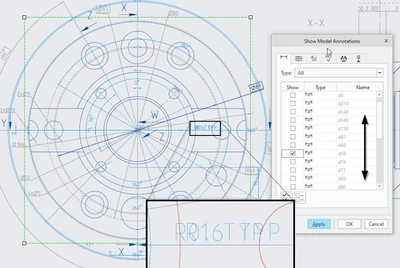
Pius_2-1696937323698.png


4. What is the use case for your organization? Describe how your idea would work in context or how it would apply to a practical situation.


I see two possible options:


Either:

The Name column is in up- or/down counting order, or can be switched.

So that the dimension the user is looking for, can be found easily.
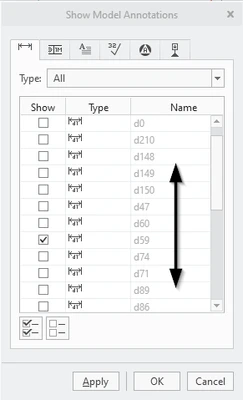
Pius_3-1696937583104.png


OR:

Creo provides a "Filter-Option" for the Name column, 

E.G. on the upper most line.
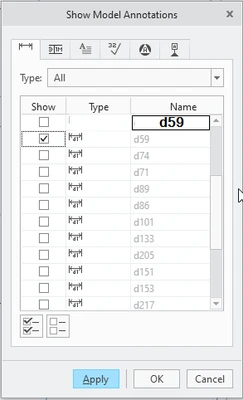
Pius_4-1696937802998.png


5. What impact does this problem currently have on your organization? (Number of users affected, hours of lost productivity, etc.)
The effect to find a single dimension is very small. Probably a few second up to minutes.

The effect to our company might be a several minutes up to few hours each day.


But in the sum of all the users world wide who are searching the right dimension, I fear the effect would be several men years each year.

PTC may know better the number of sold licenses.


I know there was an Idea in 2015, for a similar option, but it could not gain enough votes an has been archived. But the options is really what I'm looking for in many cases.


Thank's for voting 🙂

4 replies

Oct 10, 2023 12:09 PM UTC
Status changed to: Acknowledged

Hi @Pius!

Thank you for your idea. Based on the information you provided, we are acknowledging it as the Community management team. This is not a commitment from the Product team. Other users may comment and vote your idea up.

Oct 10, 2023 12:58 PM UTC

Another workaround you can use is to select a feature in the model tree or in the view to limit the number of dimensions shown.

kdirth_0-1696942554472.png

vs.

kdirth_1-1696942586032.png


PiusAuthor
Oct 10, 2023 2:45 PM UTC

Yes, might be a good workaround. In many cases this works well. Most likely good enough for my need.

Nevertheless getting the annotations listed according the order of numbering will help and show it in a good manner.

Thank’s for your hint.

PiusAuthor
Oct 12, 2023 12:21 PM UTC

I would like to add an enhancement to the above "Filter Option".


An option to filter for annotations belonging to the selected Combination State linked to the view the User is working on.


Probably this option for selection should appear only if the view is based on a Combination State, otherwise there might arise a mess.


But If so, the user sees whether there are any annotations left from the Combination State linked to the view, and select them to complete the view. Just multi select them and Apply !


Pius_1-1697112652486.png


In the actual menu, the ones applied Annotations disappear from the list.

To bring Annotations onto a view seems to be a one-way operation.

Why not getting the possibility to de-selected Annotations and bring them again out of the view.

So, leave the Annotations listed in the menu, but hooked on.


Hope that brings some more voting's!! Thank's!