
Apr 9, 2013 8:14 AM UTC
Acknowledged

Displaying different icons depending on the file type in taskbar

Related products:Creo Parametric

Icon in Windows 7 Taskbar for Creo Parametric 2.0 are close to identical. This is difficult to make differences between file types: for example assembly, part and manufacturing.
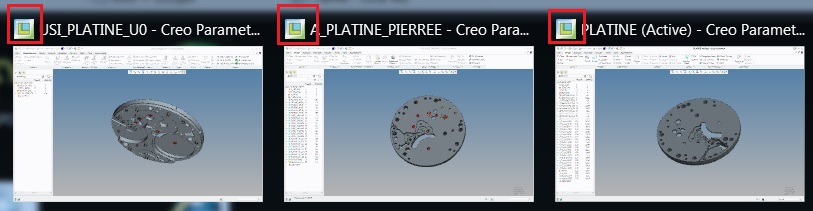
icone creo 2.0.jpg

In creo Element Pro 5, we had different icons
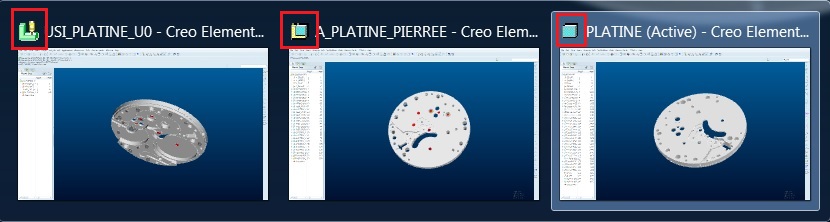
icone Creo 5.jpg

This would be great to have the same icons in Creo 2.0

8 replies

Jun 5, 2013 7:11 AM UTC

There is a need to at least see the file extension as is the case with Microsoft documents

extension+file+2.jpg

Jun 26, 2013 6:30 AM UTC

With mouse like logitech, information with Document Flip / Thumb Button are distorted

FGE_2013_06_24_002.png

Documentation

Jul 31, 2014 6:43 PM UTC

In Creo the icons were changed to represent the app that was running as opposed to the document that is open.

If, however you are only using one app and want to have the icons reflect the document type then there is a config option:

show_object_type_in_taskbar yes

Aug 1, 2014 6:42 AM UTC

show_object_type_in_taskbar option is not available in Creo Parametric 2.0. I guess it is new in Creo Parametric 3.0.

Aug 1, 2014 2:53 PM UTC

Referring to https://support.ptc.com/appserver/cs/view/solution.jsp?n=CS138276,

this option is available in Creo Parametric 2.0 M090, which datecode do you use? I just have tested this option works well in Creo Parametric 2.0 M110

Aug 4, 2014 2:02 PM UTC

Sorry all. This option was made available in Creo 2.0 M090

Thanks

Paul

Aug 11, 2014 7:04 AM UTC

Thanks for the infornaitions Paul. That works fine.

Jun 14, 2018 6:44 PM UTC
Status changed to: Acknowledged