
Jul 8, 2013 12:18 PM UTC
Acknowledged

Default choice when assembling two axes should be "coincident" (Creo 2.0)

Related products:Creo Parametric

config.pro option solutions this problem:    auto_constr_always_use_offset   never

Since Creo2 release, the default choice when assembling two axes is now "Distance".

I think that the default choice (most often used) should be "coincident."
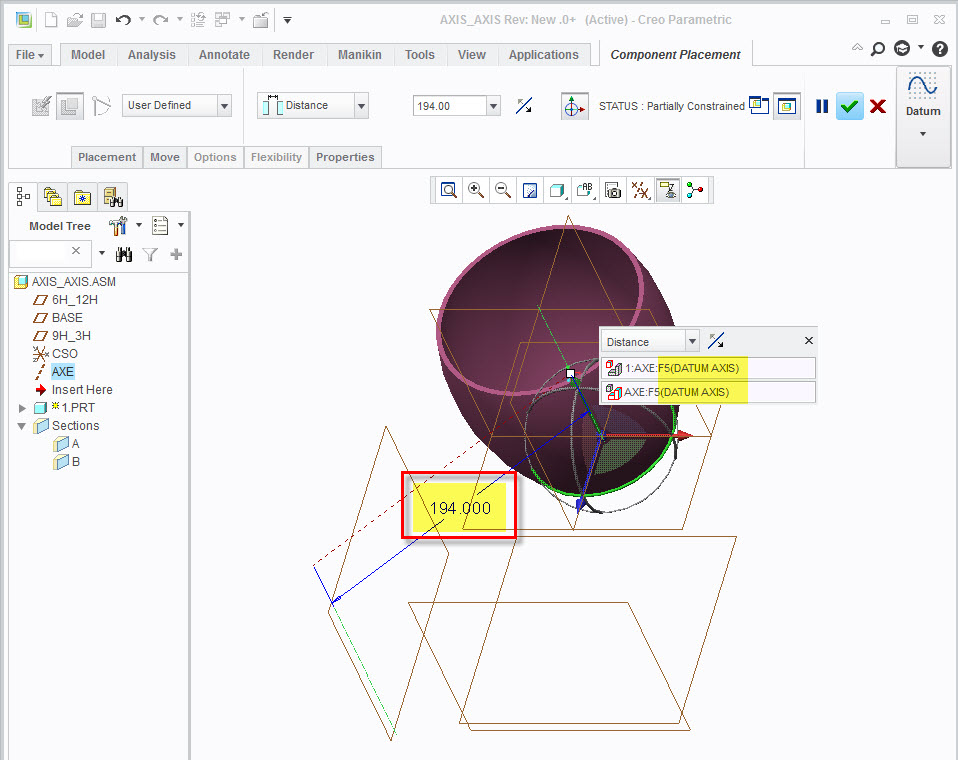
axis_axis.jpg

19 replies

Jul 8, 2013 6:18 PM UTC

Hey Antonius, have a look at how we vote (VERY often) in Switzeland ...

http://en.wikipedia.org/wiki/Voting_in_Switzerland

It is an integral part of our DNA

Jul 10, 2013 10:44 AM UTC

This option solutions the problem:

auto_constr_always_use_offset   never

Jul 10, 2013 3:00 PM UTC

In reality, the "new" assembly interface as described in the "enhancement" videos -suggests- that the "improvement" includes -intelligence- by knowing if the object is close to the references or if it is -at distance-.  So if the object is close together, then it will pick coincident, but if they are at some "significant" distance, distance will be selected.

Jul 10, 2013 3:08 PM UTC

Good find! I already set it and tested it.

Yes if they were close it would go coincident by itself. But that seems to be about 5% of the time for me. I am sure if I spent the time to move the part closer to the point of assembly it would work that way, but the time spent doing that would probably be even greater than changing distance to coincident.

Jan 7, 2014 11:10 PM UTC

Even though you found a workaround to this that works very nicely, I still voted for it just to let PTC know that keeping this config option is important as I don't want them to remove it in future versions!

Jun 14, 2018 6:09 PM UTC
Status changed to: Acknowledged
Aug 9, 2018 7:27 PM UTC

@NicolasBourgeoi1, @TomD.inPDX & @Inoram

When we first went to Creo2 I tested this and other config.pro options extensively because this is a very annoying problem for us who primarily use semi-rotationally symmetric models.  There are also some options for them to conditionally coincide or stay oriented/offset.  However, the config.pro really needs to control axis and datums independently of each other.


For rotationally symmetric parts you usually want to constrain to the center axis while often offsetting from a datum (or surface)...such as using an oriented constraint.  However, if you use this option it shifts the annoyance to moving your part from being offset to coincident and you will either loose your approximate location or cause an error.  Of course there are workarounds to all of this but the way it is done now is slower than what it used to be, and it is a highly repetitive action. 


I like having the option, but it seems the vast majority of the time axis are used to coincide with stuff, not be oriented/offset.  I am curious, if you have used the orient/offset constraint before, what have you used it for?  I am having a hard time imagining the cases it is useful (although I am sure they exist)

Aug 9, 2018 7:50 PM UTC

I occasionally use offset from axis, although usually it is during the design process more that during the production process simply because I can place and adjust a component location based on the axis without adding a feature to another component, ie. I'm trying to figure out placement of a component and I'll add the mounting for it at a later time. Occasionally I will need to place something at a distance from a hole (axis of the hole) and that specific hole doesn't have datum planes, you can use the axis along with default plane to fully place a component.

I use the option above (auto_constr_always_use_offset   never) since most of my parts are coincident via axis and/or planes/surfaces and rarely am I offsetting (with the exception of the design/layout phase).

I do find it very annoying that when I have an offset constraint and I redefine it, it will change the constraint to coincident (based on the config option) if I don't specifically reset the constraint to offset.

Aug 9, 2018 8:27 PM UTC

Not only does it change to coincident, it teases you with the number in the box grayed out and you changer the constraint type and it loses that number and sets it to zero. Yes very annoying. At least Creo2 does, I am not sure about 3+.


As far as the other question, I am not 100% sure I understand but I use parallel or angle when rotating on axis.