
Creo User Interface Do not AutoSave to User Cache.
Please include detailed documentation such as screenshots, images or video.
1. What version of the software are you running?
Creo Parametric 8.0.2
2. What is the problem?
We found the User interface file for creo parametric quite problematic to handled.
We face mixed User interface configurations and model trees.
We have encountered some crash when UI are no consistent.
3. Are you using a workaround? If yes, please describe it.
Sometimes we delete the creo user interface that is automatically saved to the user cache.
4. What is the use case for your organization? Describe how your idea would work in context or how it would apply to a practical situation.
We need a way to handle different User interface files without the autosaving option to the user cache everytime it make a modification or hit a checbox to the Creo Pop Messages.
we believe the organizations should decide if they want to have this auto save option or not.
Other possibility is to change the priority of how the UI is read to allow admin configuration to be preserved.
I believe today the User interface in the user cache has some much weight and importance than the administrator one that even the Disable "New to Creo Parametric" and "Creo Parametric Options" dialogue boxes are controlled by this file and not the admin.
In our company we manage a an application to Launch and deploy different user interface configurations more specifically different Model tree columns for specific needs (which is now saved in the UI file),
For example:
Cabling ECAD-MCAD Collaboration
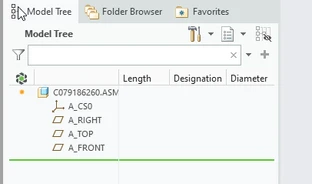
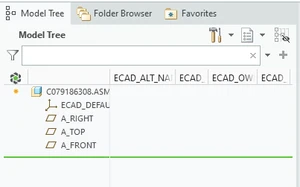
When switching from one admin UI to another admin UI the Model trees are mixed because they are saved in the User cache.
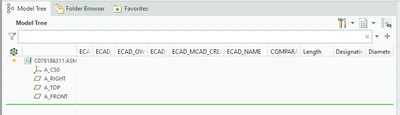
Other times we face Creo crashes and deleting the User interface in the User cache it works fine again.
5. What impact does this problem currently have on your organization? (Number of users affected, hours of lost productivity, etc.)
We have around 3k Creo parametric users with different line of business that require to work on different types of Mechanical design and analysis, (cabling, ecad mcad collaboration, simulation, etc,)