
Creo Simulate installation
Please include detailed documentation such as screenshots, images or video.
1. What product and version are you running?
Creo 8 to Creo 10
2. What is the problem?
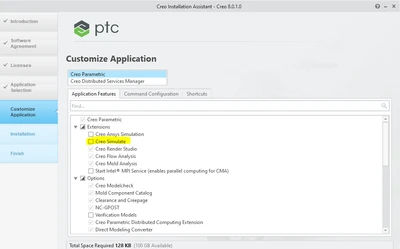
Since Creo 8 was introduced, when installing Creo Parametric, the tick box to install Creo Simulate has been disabled so Creo Simulate does not install unless you tick the box. This is the opposite behaviour of earlier versions where the Creo Simulate installed by default as this box was ticked.
3. Are you using a workaround? If yes, please describe it.
Tick the box!
4. What is the use case for your organization? Describe how your idea would work in context or how it would apply to a practical situation.
We provide Technical Support for PTC products and the change in behaviour has caught out many customers, especially those upgrading from a version lower than Creo 8 who did not expect this change. We believe Simulate should install by default unless the customer decides they don’t want it installed. Especially as almost everybody has access to the application as Creo Simulate Elite is included with a Creo Design Essentials license
5. What impact does this problem currently have on your organization? (Number of users affected, hours of lost productivity, etc.)
This has caused a lot of hours in lost productivity for many of our customers who have then had to go back to the installation media to install Simulate. This week alone, we have had reports of 180 users being affected after upgrading to Creo 10 from an earlier version where Simulate installed by default. To say they have been frustrated is an understatement.