
Creo Illustrate, making 2D symbols rotatable
Please include detailed documentation such as screenshots, images or video.
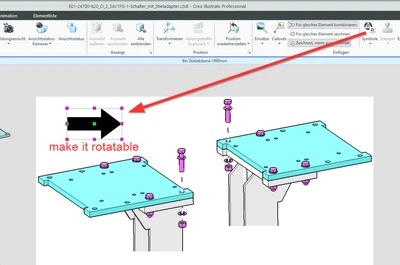
1. What version of the software are you running?
Creo Illustarte 9.1.0.0
2. What is the problem?
I would like to be able to rotate 2D symbols, especially arrows.
Without this function, I have to include a lot of differently rotated 2D arrows in the symbol library.
Theoretically I could also use 3D symbols, but the arrows in 3D are not as uniformly black as I would like. They are spatially shaded.
3. Are you using a workaround? If yes, please describe it.
Workaround? Yes, I have to include a lot of differently rotated 2D arrows in the symbol library.
4. What is the use case for your organization? Describe how your idea would work in context or how it would apply to a practical situation.
We are the technical editors of our unit and have to create pictures for operating manuals. Arrows in pictures support the expressiveness and are needed regularly. We are just introducing Creo and our wish is to get by without additional graphics tools (with which we could, for example, subsequently draw in arrows in any shape).
5. What impact does this problem currently have on your organization? (Number of users affected, hours of lost productivity, etc.)
Currerntly no Problem. But as I wrote above, we are just starting to implement CI in our business unit.
If I create a lot of 2D arrows in all possible directions of rotation, we can also use them. But of course it would be nice to have only one arrow that you can rotate. Especially since the arrow geometry is also variable, and the problem is therefore multiplied.
I can't estimate the effort in numbers.