
Dec 22, 2020 3:16 PM UTC
Acknowledged

Creo Global Interference Analysis - Exclude Skeletons and Other Improvements

Related products:Creo Parametric

The Creo Global Interference Tool could use several improvements:

  • Ability to exclude skeleton models (relevant for skeletons models with solid geometry) - suggested default to exclude skeletons.
  • Ability to sort by columns - example: sort by interference volume from largest to smallest
  • Ability to use CTRL and SHIFT to select/highlight multiple lines in the table - currently it's 1 line at a time or 'show all'.
  • Ability to toggle viewing only the interfering volume - currently always have to also highlight Part 1 and Part 2.

The screenshot below is from Creo 4 M130.
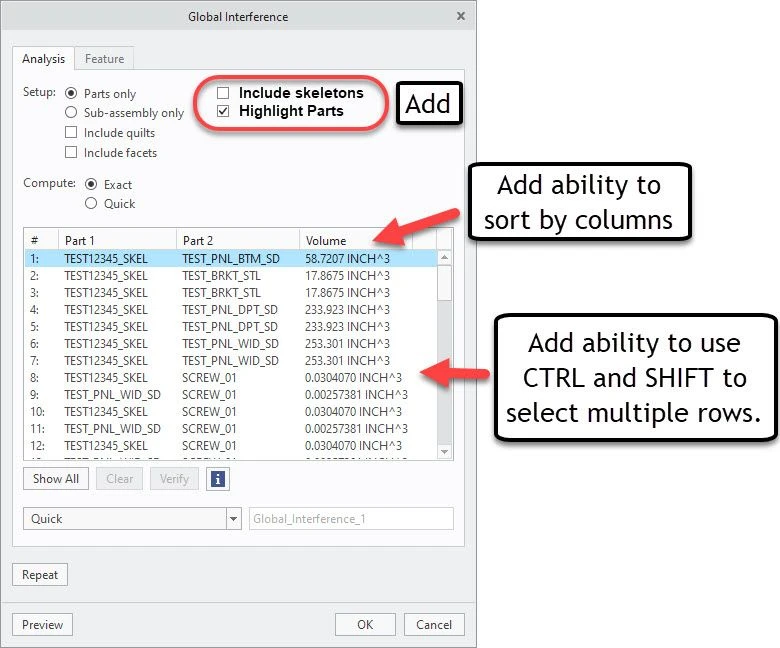
Creo Assembly Interference Improvement Ideas.jpg


4 replies

May 13, 2021 2:20 AM UTC

Also improve the interference check on thread: if screw, thread and thread thread length match then exclude them from the interference dialogue check box.


Of course thread depth in the hole shall  be bigger then the screw depth of the bolt. A check on this value should be possible, for example minimal 2 mm more thread in the hole then the depth of the bolt .

Aug 16, 2023 8:26 PM UTC

It would also be helpful if objects could be excluded and included in the interference analysis using the Search Tool (ex search by part # or attribute value). This would help each company toggle excluding their fasteners because they tend to have interference (and create a lot of false positives).


lhoogeveen_0-1692217420198.png

Note: The assembly save a copy menu has the Search Tool built in, so it's already possible to embed the Search Tool within another tool.

Mar 15, 2024 10:22 AM UTC

Complementing this outstanding idea, which in some aspects has also been requested by many of our customers and users, I would like to make the following addition.
I have worked with Solidworks for many years and the interference detection was completely covered in that CAD system as far as I am concerned. You have the following possibilities (see movie attached):
- ignoring certain parts (like for example the interference of o-rings being compressed after assembly)
- creating a fasteners folder (putting all fasteners in a separate folder, giving the user a better view of the "critical" interferences between parts)
- creating a "matching thread" folder (this way, all obvious interferences between screw tap and screw hole are placed separately. The remaining fastener interferences are then effectively collisions between e.g. the head and another component, or non-matching threads (e.g. M8 screw in M6 hole).

Additionally the possibility to show multibody interferences etc.
The above is very easy to set up using parameters; if the CAD system sees that there is a parameter in the component that indicates that that component is a fastener, the component is placed in the corresponding folder. In SW, this is the "Isfastener" parameter.


What would also be interesting is to provide the ability to add columns in the interference results to show user parameters.


In my oppinion, PTC could do much better concerning the global interference detection. If you read on the community what users do in order to eliminate the fasteners, the above propositions could make a world of difference.

(view in My Videos)

Community Manager
Feb 12, 2025 10:52 AM UTC
Status changed to: Acknowledged

Hello,

Thank you for your idea. Based on the details and popularity of your idea, we are acknowledging it as the Community management team. This is not a commitment from the Product team.