
Oct 4, 2023 6:47 AM UTC
Acknowledged

Creo Drawing Table Improvements
Related products:Creo Parametric


jvadalia2_0-1696397670895.png

jvadalia2_0-1696401820215.png

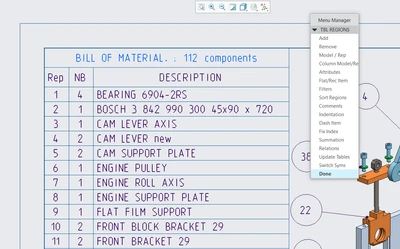
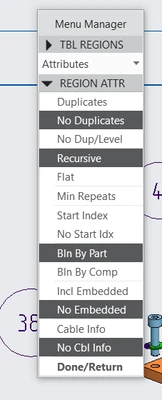
Very confusing interface.

Needs lot of learning and practice to use.

Improvement needed is : It should be as simple as Excel or equivalent.

1. What product and version are you running?
I use Creo 9 and Creo 10 both. Have used all ProE and Creo versions starting from ProE WF-3


2. What is the problem?
Creating and editing BOM Table takes lot of time. Being an old Pro user, we can manage it.

But new Users does not like the old school method of adding and editing tables in Creo.


New Users are more familiar with the new intuitive UI based and dropdown based editing rather than selecting options through Menu manager. They always compare it with Solidworks BOM table.

Even Autocad now has improved the table creation.


In Creo it is still the same older method and no improvement after this many years.


BOM is something where engineers spend most of their time and it should be easy and fast, mostly for new beginners. Because Pro-users are not  immortal 😁. They will be replaced with new users and they will require GenZ approach of managing all things. So improve and enhance what is important.


3. Are you using a workaround? If yes, please describe it.

We are managing and training new people to accept it and forcing them to become use to. Because, i don't think PTC product development team is interested to improve it.


4. What is the use case for your organization? Describe how your idea would work in context or how it would apply to a practical situation.


As i said in my problem statement, this improvement is required since long and no action is taken till now. I am also surprised that no idea is still submitted in community.

This will be really helpful for new users to accept the product.

5. What impact does this problem currently have on your organization? (Number of users affected, hours of lost productivity, etc.)


Being a PTC Partner, we are getting lot of support calls on this from our customers.

They are always complaining about the product improvements.

This affects mostly to the new Creo Users, as they have the reference of other tools where it is done easily.

Many small customers are creating BOM from standard table formats available in CREO and using it to just export BOM to CSV and then editing BOM in Excel file. They are not able to use it extensively with all functions because of tedious workflow.


With all such small improvements, which are not addressed, PTC Creo is loosing its edge against competition.

8 replies

Oct 4, 2023 8:42 AM UTC
Status changed to: Acknowledged

Hi @jvadalia-2!

Thank you for your idea. Based on the information you provided, we are acknowledging it as the Community management team. This is not a commitment from the Product team. Other users may comment and vote your idea up.

Oct 4, 2023 1:37 PM UTC

I do agree that the creation and editing of the BOM table needs work, any improvements will only happen when either PTC decides they need to get rid of more of the Menu Manager interface or a new customer with a larger order says the interface must be improved or we won't buy.

Sales drives more UI improvements than existing customer complaints.

Oct 4, 2023 1:47 PM UTC

That's a true statement, thanks @BenLoosli 

➡️Sales drives more UI improvements than existing customer complaints⬅️

Nov 16, 2023 2:23 PM UTC

@BenLoosli You just pin point the exact biggest problem from PTC. We (all the standard users from smaller companies), don't get heard. THey just change our suggestions/ideas to "acknowledge" to look like they care but, in reality, they don't give a 5h1t!! Always putting the effort where the money is. It have always been and always will.

Getting really tired of this.

BTW, @jvadalia-2 , it is an really excellent and much overdue suggestion. Managing tables is just, awful and a pain in the butt.

😌✌️

Nov 16, 2023 2:48 PM UTC

I am in that same 'smaller company' boat! We have less than 20 seats of Creo and around 100 seats of Windchill. I used to work for a company that had over 400 seats of Pro/Engineer and around 1000 seats of Windchill. We did get a bit more driving of PTC development when we first implemented PDMLink 7 and had to add over 12 customizations to make it work for us. We were using PTC Global services, so they knew what we were doing and needed. BUT, every little change we requested came with a bill from PTC! Finally our CIO, engineering CTO and project leader went to Needham and sat down with Hepplemann and told him that PTC was to finish the project and no more billing for little changes. 8 of the changes we had requested were incorporated into Windchill 8!


Nov 16, 2023 3:04 PM UTC

Wow, thanks for your testimony @BenLoosli , it kinda makes me feel better but, not in a good way. What i'm saying is that, you just confirmed the doubts I had concerning PTC behaviors and practices but now, I'm just convinced. 😉

It's really regretful that PTC embrace this kind of thinking and making business cause, if they've put the effort of listening to the vast majority of their community "standard" or "smaller" users, maybe they could make their software popularity grow and expand and get some Solidworks/Inventor market share.

Well, thanks again and, hopefully we will get heard and see some changes one day!

🤞

Jun 23, 2025 12:25 PM UTC

Thanks for the suggestion!

This is one of my main problems with learning Creo - outdated, and completely unintuitive, unconventional user interface.

The complexity of editing tables is the most obvious example of this - it doesn't follow the conventions of every other program I've ever used.

I'm hearing over and over "you get used to it", but frankly, that's not good enough.