
May 13, 2020 2:25 PM UTC
Acknowledged

Creo 7 mark selected feature in both Body and complete tree

Related products:Creo Parametric

In Creo 7 the marking of a selected component changes when you start using multibody.

Instead of showing the location in the complete tree, it only shows the feature in the body, tough sketches are not appointed to a body, this means of searching the model tree to find the feature and there the referenced sketch.


It could simply be solved by lighting up both the "extrude1" in de body part of the tree as well as the complete chronological part of the tree.
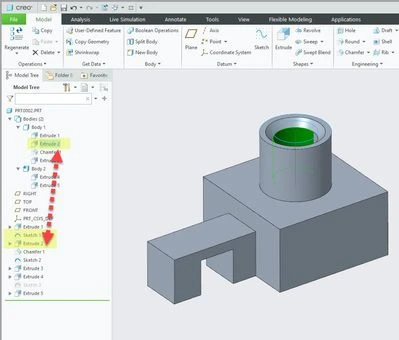
creo7-feature-selection.jpg


4 replies

Jun 12, 2020 8:28 AM UTC

hi there.


just wondering if you found a solution to this issue? i am having the same issue.

don't understand why the selected feature from the graphics window only highlights in the body and not the tree.


regards

doug

Kristof_DAuthor
Jun 12, 2020 11:18 AM UTC

Yes, product management reached out to me.

If you go to the model tree items, you can uncheck  "Auto locate features in body-sub-nodes", this will result in only the model tree features when selecting something on the model.

Kristof_D_0-1591960671186.png


Jun 12, 2020 3:19 PM UTC

hi Kristof.


thanks for your reply. I actually found this check box late last night but thanks for confirming.


kind regards

doug

Community Manager
Feb 12, 2025 10:52 AM UTC
Status changed to: Acknowledged

Hello,

Thank you for your idea. Based on the details and popularity of your idea, we are acknowledging it as the Community management team. This is not a commitment from the Product team.