Create some method of feedback to user WHY object won't show in drawing
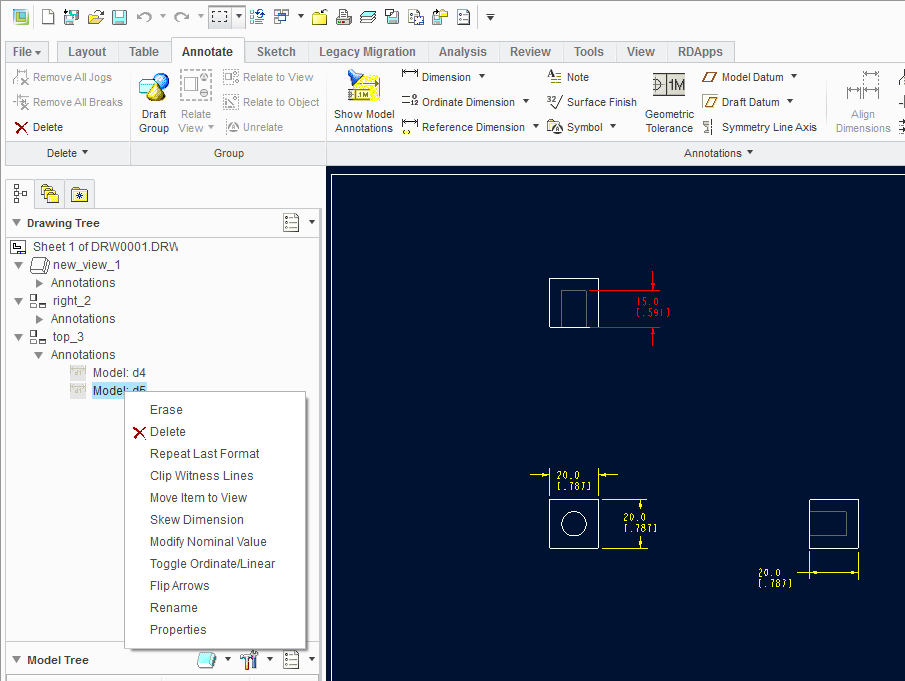
I don't know exactly how to state this. Users become very frustrated when functions don't work to their expectations. I know this is a training issue, but I believe PTC can make things more intuitive for the users. In my picture you will see two dimensions in the "top_3" view in drawing tree. User wants those two dimensions to show in the drawing. However as shown in drawing tree the dimensions are erased or (hidden), there is not an "Unerase" command in the RMB menu. The reason in this specific case is the dimension is on a layer which is hidden in that view. There are other possibilities why the dimensions could not be displayed.
Possible resolution:
Add a "INFO" to the RMB that would display all information about the selection. Don't limit info to dimensions, other items have same issues, surface finish, gtols, notes, etc..
Example: D5 is on Layer "DIMS", Layer "DIMS" is Hidden on Drawing & View "top_3", D5 is defined in Drawing Program state "ERASE_DIMS"
Please introduce something that can help users use the software instead of spending their time being a detective.