
May 16, 2018 12:28 PM UTC
Alternate Solution

Create a new Creo Feature "Oblong Hole"

Related products:Creo Parametric

Hello,

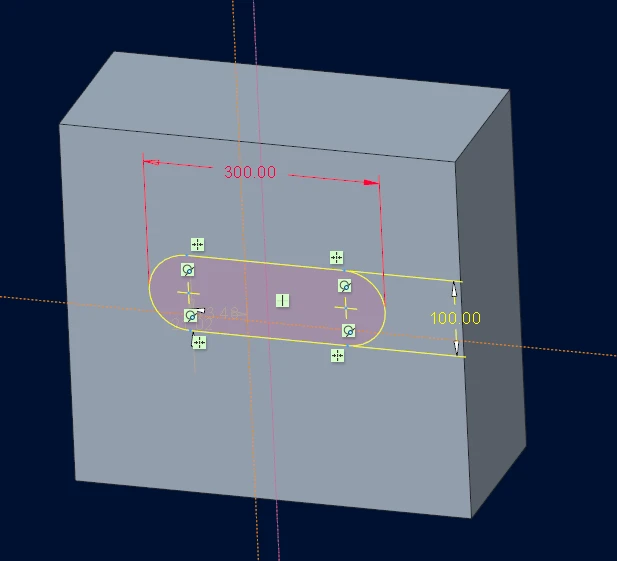
Many users are requesting the possibility of having a new feature for oblong holes. At the moment creating a simple hole is very easy and customizable. But creating an oblong hole require more time :

1 - creating a cutting extrude

2 - sketching the oblong shape, or importing it from sketcher palette...
  lecnef0_LECNBP5191_2018-05-16-000563.png
But still longuer than having a dedicated "Oblong Hole" Feature Inside of Creo Parametric.

Thanks in advance.

8 replies

May 16, 2018 10:10 PM UTC

One method of getting geometry/features into your model that are not standard Creo Parametric features, is to use the simple copy/paste functionality from a "coupon" model into your target model.  We do this with features that are standard or common for use with standard hardware, components, etc.  Some examples are "D" holes for spec driven and industry standard connectors, hole sizes and patterns for standard equipment rack mounts, and captive fastener mounting holes.


The method involves creating a simple block model, what we call the "coupon", with the features already created, fully annotated, and including parameters, relations, datums, GTOLS, tolerances, groups, notes, etc. as needed.  Multiple coupons are created for different feature type.  i.e. connector hole cutouts, rack mount holes, etc. This technique helps drive use of common dimensioning and annotation of the features.


We create mapkeys with a corresponding menu pick that opens the coupon model, the user selects the features they want to copy (usually a group), hit CTRL-C, re-active the target model, hit CTRL-V, and then follow the prompts to place the features.  If the features are standardized, there is no need to modify them in any way.


Yes, you can do this with UDF's as well, but the use of UDF's is clunky even when semi-automated with mapkeys/scripts.


As always, to make the placement of features easier, use datum features in your model (possibly from a skeleton or master model) to drive the location and orientation of the features.  This reduces the number of picks for placing the features, makes replacing the features easier if you need to delete the existing feature in favor of another feature type, and reduces dependences between components and feature geometry in higher level assemblies.

Jun 14, 2018 8:42 PM UTC
Status changed to: Acknowledged
fnefliAuthor
Jul 2, 2018 8:46 AM UTC

@dnordin thanks for detailing your procedure

Jun 23, 2020 5:13 PM UTC
Status changed to: Under Consideration

under consideration beyond Creo 8.0

fnefliAuthor
Jul 7, 2020 6:47 AM UTC

@mneumueller good news ! thanks

Nov 7, 2023 8:02 AM UTC

Hi @mneumueller , Creo 10.0 was released, does PTC has a plan to add this enhancement into Creo 11.0?

Jun 23, 2025 12:35 PM UTC

Moving from other CAD programs where slot features, and slot sketch features are standard.
Either defined just like a hole, but with a length and direction; or sketched as a circle, but with 2 centrepoints instead of 1 (3 clicks in total).

I'm amazed this isn't just there!

Jun 24, 2025 4:01 PM UTC
Status changed to: Alternate Solution

Please note that with Creo 12, you have updated racetrack/slot shapes in sketcher that you can combine with the new feature preset capability to save Extrude feature presets representing the slots of your preference. You can then invoke them directly from a right click onto the Extrude icon in the UI.  Please refer to the Creo 12 What's New page for more information. Feature Presets
Here an example screenshot of it:

mneumueller_0-1750780725076.png