
Oct 6, 2017 7:57 PM UTC
Archived

Create a Chamfer option that will create geometry & dimensions as shown in image.

Related products:Creo Parametric

Currently in Creo 4.0 M030 when trying to create a chamfer referencing an edge of non-perpendicular surfaces you cannot get desired geometry or dimensions as shown in image. The work around is to create via other feature types (Revolve, Sweep, etc..). This process takes more time than desired. Please consider adding this functionality.
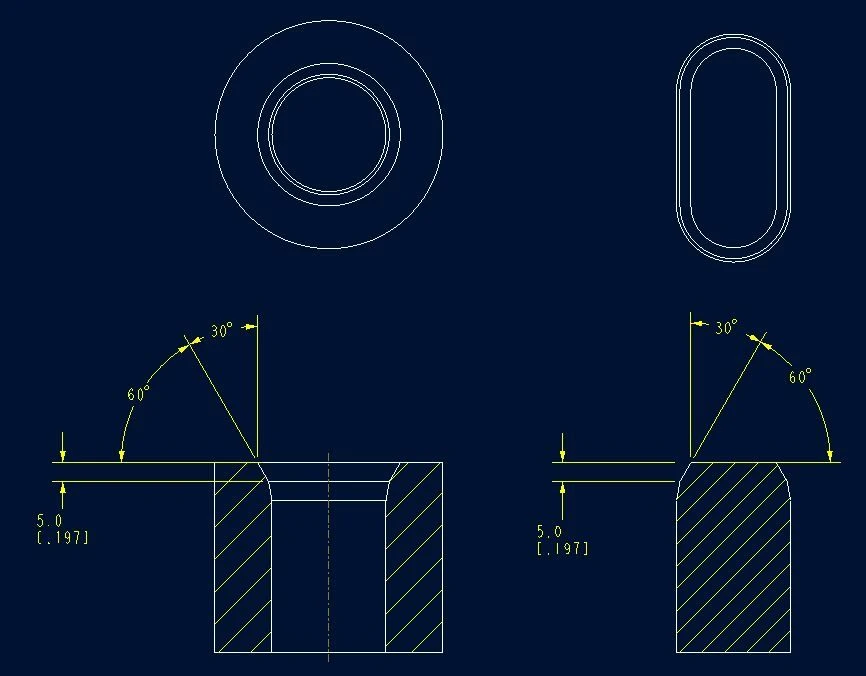
DesiredDesired

4 replies

Oct 6, 2017 8:07 PM UTC

Isn't your 30° and your 60° over-dimensioning your chamfer? Maybe I'm missing something?

Using Angle x D option in chamfer you get almost this exact result except for the "over-dimensioning"

anglexd.jpg

Oct 16, 2017 9:08 PM UTC

Yes the 30° & 60° are duplicate, I want to be able to chose which dimension scheme I want to use while creating the chamfer. No, the Angle x D does not give the desired output, Notice in my images the chamfer is on an edge that was previously chamfered. Angle x D creates the angle from the existing angled geometry, not from the planar surface.

Oct 17, 2017 10:41 AM UTC

Ah, yes, I see it. It's always the details that get you.

olivierlp
Community Manager
Jan 4, 2022 2:46 PM UTC
Status changed to: Archived

Hello,

We are archiving your idea as part of a general review. This action is based on the age of your idea and the total number of votes received, as per this announcement.

You can always post a new idea with all the details required in the form.

Thank you for your participation.

Olivier