
Jun 5, 2024 3:05 PM UTC
Acknowledged

Config setting for default pipe solid template

Related products:Creo Parametric

1. Describe the Problem

When creating a solid part of a pipeline, there is no default part template selected. This often results in the template not being selected and the required attributes to be missing off the part that are required for our Windchill PLM system, along with strange mass properties behaviour, no default views, planes, etc. 
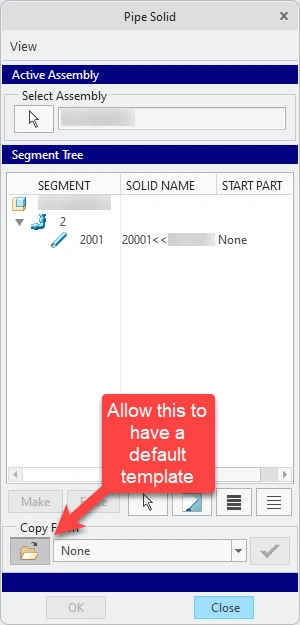
Pipe Solid Default template.png


2. Are you using a workaround?
Ensure to always select a template. Use modelcheck to ensure a template has been used.

3. What is the use case for your organization?
I would suggest that a configuration option in config.pro along the lines of template_pipingpart to be available, or for the system to use the default solid part template as a default.

4. What impact does this problem currently have on your organization?
Almost every time a pipe is produced (we design maybe 10-20 per month) the part template is missing, and so the part must be recreated, along with any drawings etc.

3 replies

Jun 5, 2024 3:06 PM UTC

This problem is also covered in the following article: Article - CS125325 - How to create pipe solid part using a specific template in Creo Parametric (ptc.com) and so it would seem is a common request. 

olivierlp
Community Manager
Jun 5, 2024 4:16 PM UTC
Status changed to: Acknowledged

Thank you @Chris_Johnson for your idea. Based on the information you provided, we are acknowledging it as the Community management team. This is not a commitment from the Product team. Other users may comment and vote your idea up.

Olivier
Jun 11, 2024 7:43 PM UTC

This also applies for the Manufacturing Mold Cavity module. When extracting parts after splits, we have to always remember to grab the correct template. Which we never change, and use always the same. But if we do not select it, no template is used, instead of using a default template.