Oct 4, 2017 10:15 AM UTC
Delivered

Config option to Hide/Show Model Tree Columns

Related products:Creo Parametric

PTC should create simple config option, which controls if Model Tree Columns are hidden or shown.
show_model_tree_columns_on_start yes/no

See the pictures below.
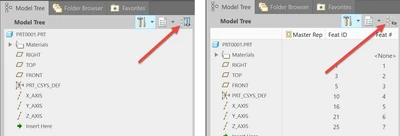
image.png

6 replies

Oct 4, 2017 12:09 PM UTC

This already exists. Use simprep_column_display manual

Oct 4, 2017 1:18 PM UTC

This config works only for Current Rep column. It doesn`t work for all the columns.

I suggested a config option that would turn on/off the button: Toggle the visibility of shown columns in tree.

See the pictures in the first post.

Oct 4, 2017 1:56 PM UTC

Ah, I see the difference now.  I have my tree.cfg file (and related config option mdl_tree_cfg_file) set to not have any columns shown.  With it setup this way, the button is grayed out.  Yes, I can see where it might be nice to have a bunch of columns pre-defined but not have them displayed until you push the button. 


Looking in the knowledge base, it actually says this does not currently exist:

"There is no option to turn this toggle off by default, if request this functionality, refer to Product Ideas @ PTC Community"

https://www.ptc.com/en/support/article?n=CS195002

Jun 14, 2018 8:22 PM UTC
Status changed to: Acknowledged
Sep 28, 2022 1:46 PM UTC
Status changed to: Delivered

Creo 9.0 saves the last state of the model tree column visibility into the .ui file, and restores the visibility status of those columns the next time Creo is started

Sep 29, 2022 6:30 AM UTC

Martin, thank you for this information.👍

I didn`t notice this in the documentation about What is new in Creo 9.
