
May 23, 2016 9:08 AM UTC
Archived

Colour of ribbon menu, dialogue windows and menu manager in Creo 3.

Related products:Creo Parametric

Creo Parametric 3 uses almost a quite white user interface. It is possible to change only colour of background of graphic window but not background of ribbon menu, dialogue windows or menu manager.

Will be possible to enable to change colour of background of ribbon menu, dialogue windows or menu manager to get more contrast, synoptic, ergonomic and nicer user's interface ?

Using of some darker colour or any optional colour would be good - see image (comparison with Pro/ENGINEER with better colour scheme as example).

@
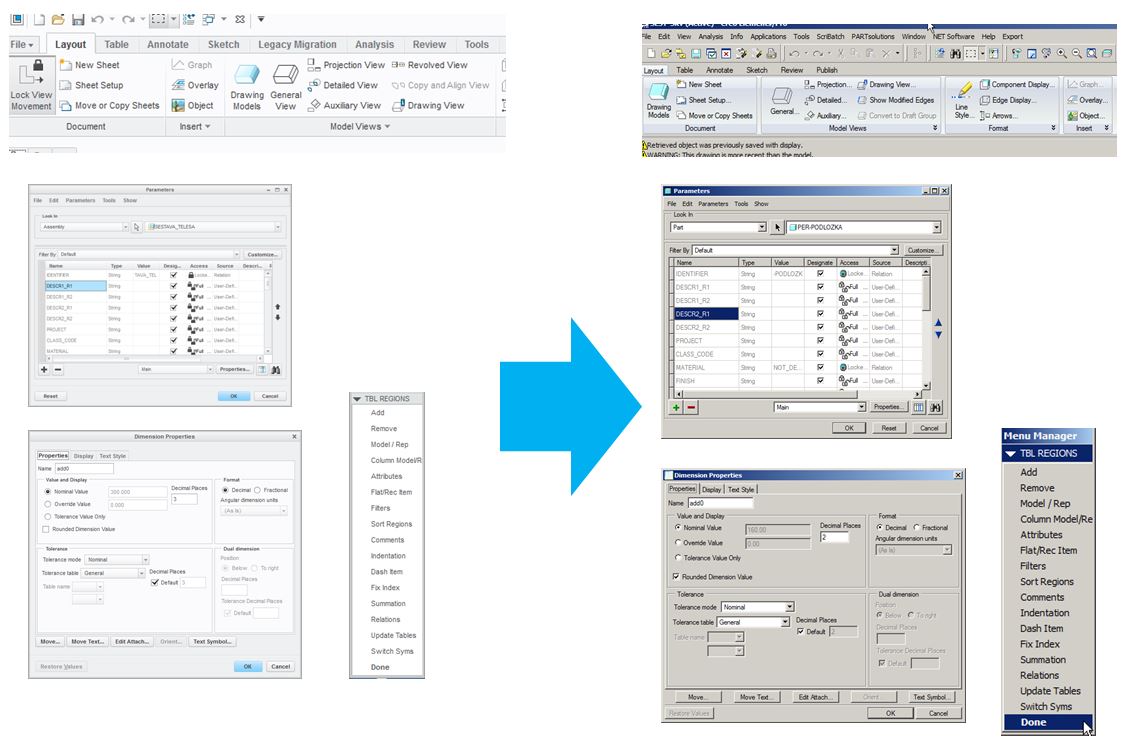
colours_creo.jpg

8 replies

May 23, 2016 12:52 PM UTC

Maybe Creo Parametric 4.0 brings back old functionality...

May 23, 2016 1:02 PM UTC

There is another Idea for this same issue.

Possibility to change ribbon color in Creo 3.0

The short answer is that we will be providing three options for a UI "skin" in Creo 4.0 (light, medium, dark). Please refer to the comments in the Idea noted above for details.

May 23, 2016 1:27 PM UTC

Josef Potesil‌

You may want to vote on your own idea .....     

Toby Metcalf‌ - another duplicate?

May 23, 2016 1:50 PM UTC

This one is marked as a Dupe - Dale 🙂

May 23, 2016 2:47 PM UTC

I just marked it as duplicate per my earlier comment...

May 23, 2016 3:14 PM UTC

Correct, I was just notifying Toby (at PTC) so that he could officially change the status. You are the one who found the duplicate. Thanks for letting us know.

May 24, 2016 4:35 AM UTC

Thanks, it's good that there is a chance to have improved GUI.

olivierlp
Community Manager
Jan 4, 2022 3:41 PM UTC
Status changed to: Archived

Hello,

We are archiving your idea as part of a general review. This action is based on the age of your idea and the total number of votes received, as per this announcement.

You can always post a new idea with all the details required in the form.

Thank you for your participation.

Olivier