
Check-in option for replace "not unique" items with items that are in Windchill already
1. Describe the Problem
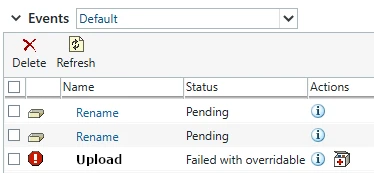
During a Creo check-in to Windchill if an item already exists the upload fails with the message "XXXX is not unique". Often this is because a user has downloaded the same vendor STEP file as another user or the user has accidentally assembled CAD from a network drive instead of from the Windchill repository.
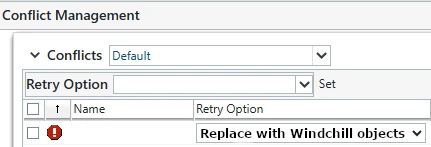
For our organization, the items that are in Windchill already are exactly the same that a user is trying to check in. There should be an option for "replace with items in Windchill" to make it easier for users to check in the parts without needing to search and add the files to their workspace (remembering to uncheck the "Reuse modified workspace content" box).
There should be a drop down option just like there is for the option to remove items from workspace when deleting an item.
2. Are you using a workaround?
Yes, searching, adding the items from Windchill to the workspace and remembering to uncheck the "Reuse modified workspace content" box.
3. What is the use case for your organization?
Save time with training new users, makes it easier for all users to just replace with Windchill objects when that is what they want.
4. What impact does this problem currently have on your organization?
Lost time from users trying to figure out how to replace what they have with what is already in Windchill
Status changed to: Archived
Hello,
We are archiving your idea as part of a general review. This action is based on the age of your idea and the total number of votes received, as per this announcement.
You can always post a new idea with all the details required in the form.
Thank you for your participation.