
Feb 1, 2016 12:20 PM UTC
Archived

Change the default value for drill point angle

Related products:Creo Parametric

Add a setting or attribute in holes tables in order to allows to change the default value for the drill point angle.

Example: Today for ISO standard holes, the value of drill point angle  is 118°. For this kind of hole,  we need for this geometry another default value (140°).

All our tools in the workshop got the angle 140°.

When creating an hole, it should be automatically created with a drill point angle 140° and not like currently 118°. Users can't change this value each time they create a new hole feature.
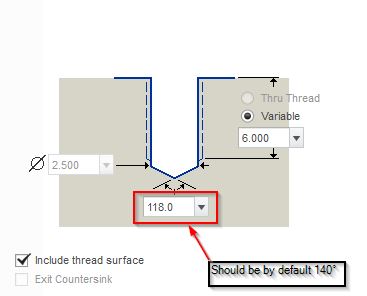
drill_point_angle.jpg

6 replies

Feb 1, 2016 7:15 PM UTC

You can create your own user interface. See AutoIT Hole UI Scripts you may find useful. - PTC Community for inspiration.

Feb 3, 2016 10:57 AM UTC

Thias Idea is similar to Idea 2962 Additional Parameters in the hole_parameter_file.

Feb 3, 2016 1:06 PM UTC

Similar, yes, but idea 1294 has been open since May of 2012 and idea 2962 has been open since July of 2013 and nothing has happened yet. 

Feb 3, 2016 1:32 PM UTC

Nothing has happened? So...business as usual.  Carry on.

Sorry, bad attempt at humor.

Feb 21, 2020 5:01 PM UTC

This is now 'Current Functionality' as of Creo 4 M060 and Creo 5.0.2.0 using the config option "drilled_hole_tip_angle".

olivierlp
Community Manager
Jan 4, 2022 3:59 PM UTC
Status changed to: Archived

Hello,

We are archiving your idea as part of a general review. This action is based on the age of your idea and the total number of votes received, as per this announcement.

You can always post a new idea with all the details required in the form.

Thank you for your participation.

Olivier