
Aug 2, 2012 2:18 PM UTC
Archived

Center marks and dimensioning

Related products:Creo Parametric

When creating a drawing where you have a radius created with the round tool or a radius created as a part of a revolved feature it would be nice to be able to insert center marks for these features without having to sketch them and relate them to a view or create a custom symbol.  In some situations you need to be able to dimension to the center of these features which can be done but without a center mark shown it may be unclear what you are actually dimensioning to.
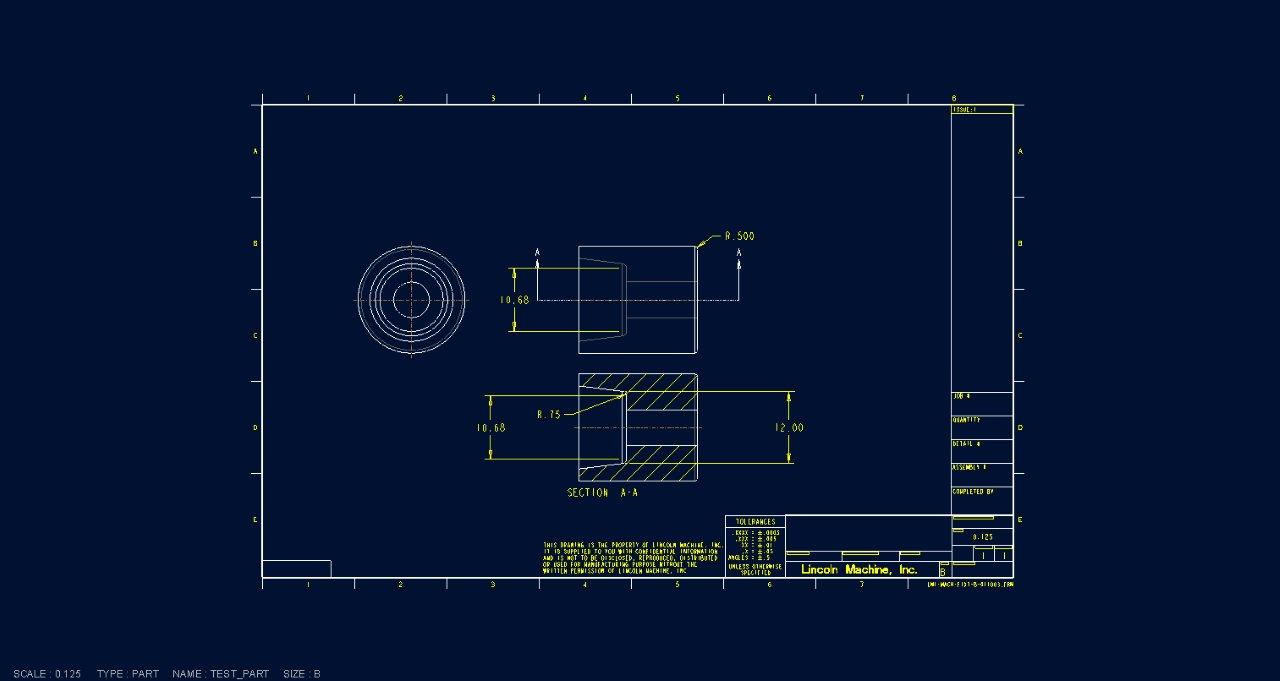
test_part.jpg

    5 replies

    Aug 2, 2012 2:34 PM UTC

    you can, kind of, but it means manually creating the dimension again using the Z-radius icon (found under the annotation tab), not the best, but it works.

    Regards

    John

    Aug 2, 2012 4:17 PM UTC

    A smart intersection mark would be appropriate at the 12.00 dimension.  I often find myself sketching these or using dimension extension lines with breaks to create these (when available).

    If you must create the center marks for the 10.68 dimension, you might consider a couple of axis datums in the model.  You can probably make these parametric using sketched features.

    Then again, I agree that we should be able to create associative "centerlines" on any circular feature anywhere on the drawing we'd like including through a cylinder lengthwise.

    Aug 6, 2012 11:18 AM UTC

    Definitely useful.  I frequently construct revolved features with a dimension to the centre of an arc; and I'm sure there are other times when this would be very handy.

    Feb 8, 2016 2:31 PM UTC

    There are two options if no axis was generated for the feature.  For what you describe if the 10.68 dim was to the center of the fillet I would extend the extension line through the radius and break the extension lines.  I wish PTC would create a centerline front that could be applied to extension lines.

    This is breaking extension lines:

    Break Ext Lines.JPG

    I just learned what I thought was option 2 is not available in a revolved sketch. Sketch Geometry Point is not available in the Revolve Feature.  The help even tells us "if the section is extruded...".

    Sketch Datum Point.jpg

    Mar 16, 2019 1:25 AM UTC
    Status changed to: Archived