
Jul 18, 2025 4:33 PM UTC
Acknowledged

Bypass "Select a Certificate" prompt when there is only one client certificate

Related products:Creo Parametric

1. Describe the Problem

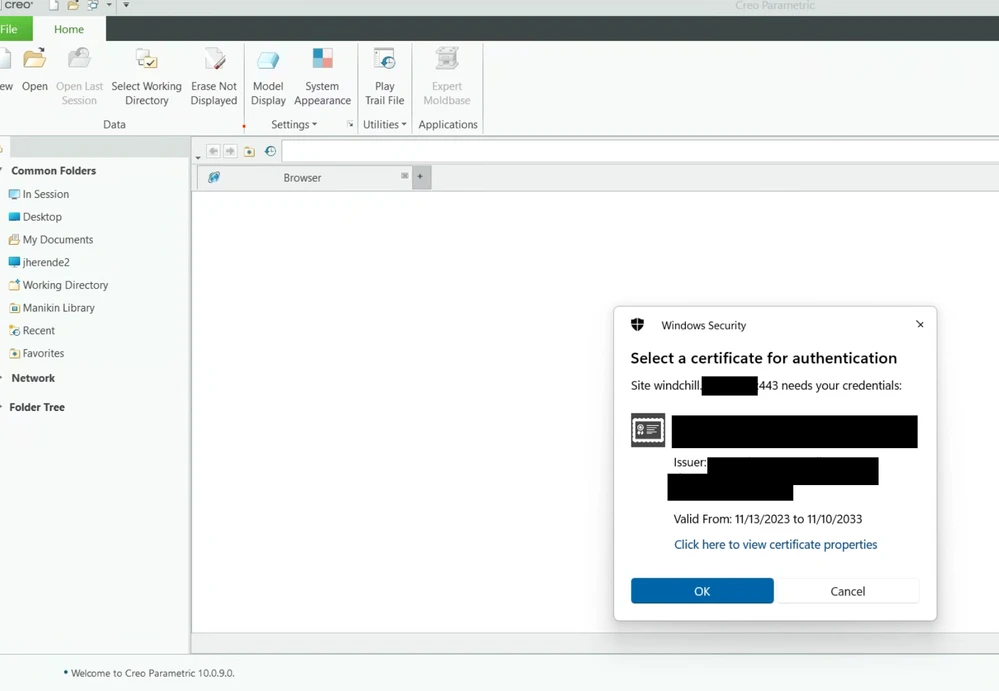
SPR 14980355 introducted a "Select a certificate" popup that prompts users to choose a client certificate to send to the server for authentication. The popup appears every time Creo Parametric is started. In our case, there is only one certificate available, so the popup does not provide any functional use and is purely an annoyance for the user.


2. Are you using a workaround?
No.

3. What is the use case for your organization?
If there is only one client certificate, the popup should be bypassed and the client certifcate should be sent to the server.

4. What impact does this problem currently have on your organization?
The popup causes a delay in Creo start-up, and is a poor user experience.
Catalina_0-1753099606180.png


4 replies

Jul 18, 2025 6:19 PM UTC

See if any of these suggestions help:


For Internet Explorer:

  1. Open Internet Options from the Control Panel.
  2. Navigate to the Security tab and select the relevant zone (e.g., Trusted sites).
  3. Click on Custom level.
  4. Under Miscellaneous, enable the option "Don't prompt for client certificate selection when only one certificate exists."
  5. This will prevent the pop-up from appearing if only one certificate is available for selection


For Google Chrome (via Group Policy):

  1. You can configure Chrome to automatically select a client certificate via Group Policy settings if you have administrative access and are on a professional Windows edition within a domain environment.
  2. The AutoSelectCertificateForUrls policy allows you to specify URL patterns and filters for automatic certificate selection.


Manage Certificates in Windows:

  1. Open the Windows Certificate Manager (type certmgr.msc or certlm.msc in the Run dialog).
  2. Navigate to the Personal folder to view the certificates installed on your machine.
  3. Deleting older or unnecessary certificates can reduce the number of options the pop-up presents, making it easier to select the correct one or potentially enabling automatic selection if only one valid certificate remains.


jherendeAuthor
Jul 19, 2025 12:30 AM UTC
We have recently updated to Creo 10.0.9.0 from Creo 8.0.6.0, where this popup was not seen. The popup is only appearing in the Creo embedded chromium browser.

Our settings for IE and number of client certificates are correctly set. I did not see a AutoSelectCertificateForUrls set on our systems. I will attempt to set the Group Policy and update if that fixes the issue.

Community Manager
Jul 21, 2025 12:08 PM UTC
Status changed to: Acknowledged

Thank you @jherende for your idea. Based on the information you provided, we are acknowledging it as the Community management team. This is not a commitment from the Product team. Other users may comment and vote your idea up.


Please also note that you make a reference to a case number but users will not have access to it and won't be able to get the insights you intend.

jherendeAuthor
Oct 28, 2025 10:02 PM UTC

I attempted TomU's suggestions in the comment above and also attempted overriding using Chromium policy in the Windows registry, but could not find a way to change the setting.