
Dec 9, 2024 12:00 PM UTC
Acknowledged

Better handling of weak dimensions

Related products:Creo Parametric

1. Describe the Problem

When working with dimensions in Creo, if a dimension is weak and the user finds its value acceptable (e.g., “10”), clicking the dimension and pressing Enter or retyping the same value does not automatically convert it to a strong dimension.
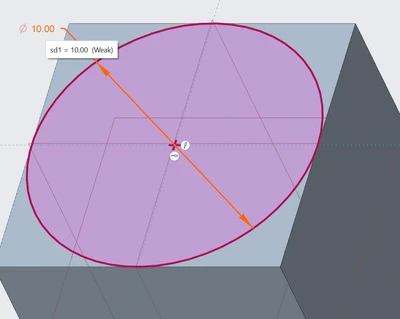
 

problem.png

The only workaround is to manually right-click the dimension and explicitly make it strong, adding unnecessary steps to the workflow and increasing the risk of errors if this step is overlooked.

2. Are you using a workaround?
No

3. What is the use case for your organization?
This results in the dimension remaining weak and susceptible to unintended changes during model updates. The only workaround is to manually right-click the dimension and explicitly make it strong, adding unnecessary steps to the workflow and increasing the risk of errors if this step is overlooked.

4. What impact does this problem currently have on your organization?
Hard to demonstrate

4 replies

Community Manager
Dec 9, 2024 12:37 PM UTC
Status changed to: Acknowledged

Thank you @Michael for your idea. Based on the information you provided, we are acknowledging it as the Community management team. This is not a commitment from the Product team. Other users may comment and vote your idea up.

Dec 9, 2024 1:48 PM UTC

I agree that entering a value, even if the same value as current value, should lock the dimension if sketcher_lock_modified_dims is set to yes.


As a work around, Toggle Lock can be added to the mini toolbar.  Selecting the dimension brings up the mini tool bar and selecting Toggle Lock will lock the dimension and, if weak, will open the edit value box.

kdirth_0-1733751850059.png


Dec 10, 2024 12:49 AM UTC

I also agree that if the dimension is edited, even if the user types the same value, it should automatically be converted to a strong dimension (and eventually locked if configured to do so). Using right click to bring the pop-up menu for a very common operation takes extra time and extra-clicks. I avoid as much as possible using the right button on the mouse to avoid carpal tunnel syndrome, which is a pysically debilitating condition.

Dec 10, 2024 1:27 PM UTC

One LMB click on the weak dimension brings up the mini toolbar.  One more LMB click activates the lock and opens the dimension edit box.  No need for the RMB.


Two LMB clicks on a dimension opens the dimension edit box.  Same number of clicks with the same button, but one ensures a lock.