
Be able to stay in the active tab when playing mapkey
It would be nice to have the possibility to define mapkeys adding the “intelligence” of staying in the active tab.
Examples of the problem:
-> Using a mapkey for printing with the "Refit" command in drawing mode, the ribbon changes to the "View" tab in Creo 2.0
-> Mapkey including Update Sheets and Print actions end up at the “Review” tab.
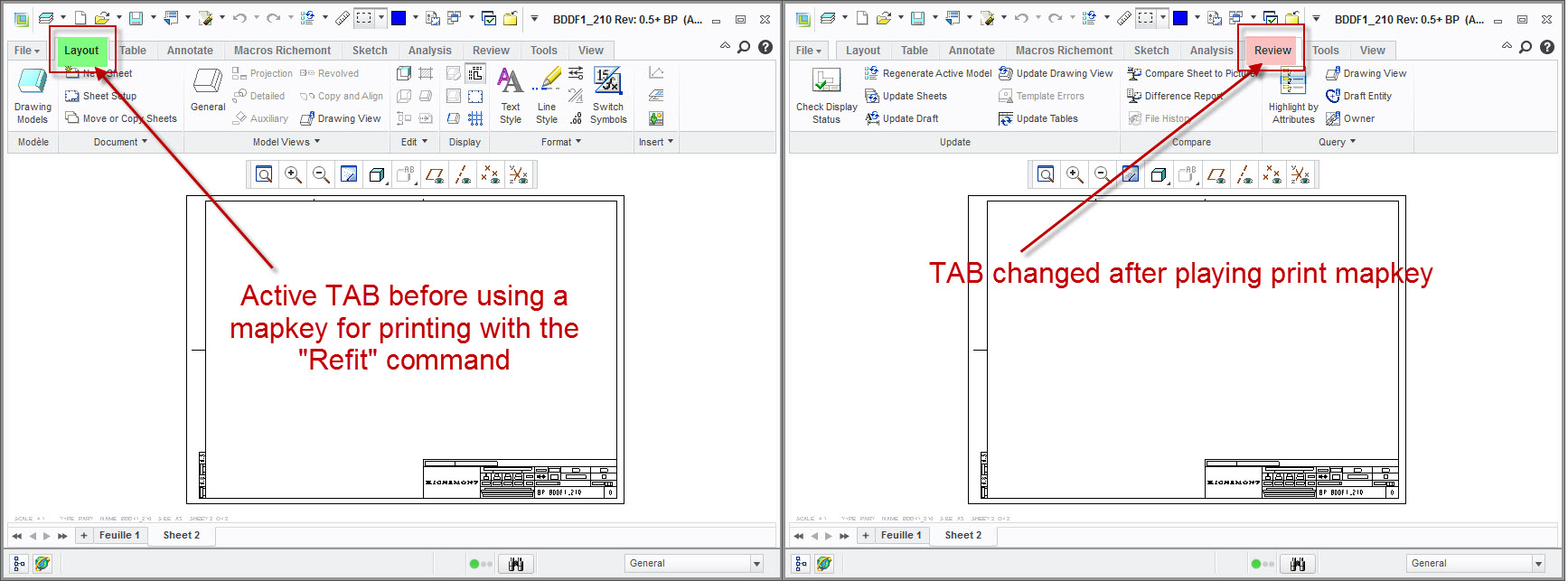
PTC says that this is the correct behavior for Drawing Mode. The last command leaves you in the corresponding tab.
Type of mapkey
mapkey a4 @MAPKEY_NAMEprint on laser A4;@MAPKEY_LABELa4;\
mapkey(continued) ~ Command `ProCmdViewRepaint`;%hide;\
mapkey(continued) ~ Command `ProCmdDwgUpdateSheets`;\
mapkey(continued) ~ Command `ProCmdModelPrint`;\
mapkey(continued) ~ Activate `print_config` `01 piagvapt110 A4 (BT)`;\
mapkey(continued) ~ Activate `print_config` `OK`;\
mapkey(continued) ~ Activate `Print_file` `OK`;