Mar 18, 2013 9:34 AM UTC
Under Consideration

Be able to customize Graphics Toolbar (Creo 2.0) - Add icons

Related products:Creo Parametric

Add functionalities to Graphics Toolbar.

For example: adding Datum Tags.
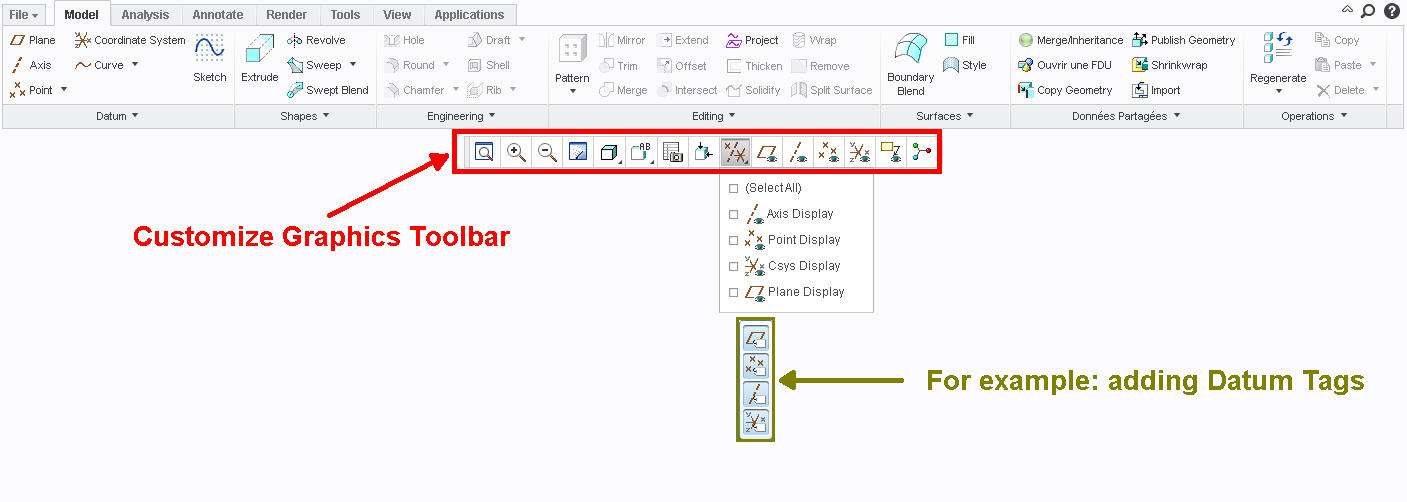
Customize Graphics Toolbar.jpg

5 replies

May 21, 2013 6:24 PM UTC

would love to have previous view in there, among others

Apr 9, 2015 1:54 PM UTC

allow to customize existing Creo Ribbon groups would be nice too... not only switch them on/off, or create your own.

Jan 4, 2017 8:38 AM UTC

Also need to add some display icons....please see image below. These toolbar takes a lot of place but can't be optimized.... 😞

NOT IN CREO3 / NOT IN CREO 4: WHAT A PITY !!!!

Graphic_toolbar.png

Jun 14, 2018 6:11 PM UTC
Status changed to: Acknowledged
Jun 24, 2020 7:29 PM UTC
Status changed to: Under Consideration

The in-graphics toolbar was limited to a set of specific commands needed by users throughout the use of Creo.  For example, we added a new icon to start and stop the Creo Simulation Live solver when outside of the Live Simulation tab.  PTC limited the customization of the in-graphics toolbar to prevent overloading the graphics window with a lengthy toolbar.


We can see there being a need to add additional commands to the toolbar and are consider such an option to customize it, like we do with the ribbon.  If we open the customization capabilities in the future, we will likely limit it to a set number of visible commands that can be added above and beyond the current list.


Regards,

Mark Fischer

Sr. Director, CAD Product Management
