May 14, 2019 1:44 AM UTC
Acknowledged

Autonumbering in Creo Parametric - Don't Consume Number Unless Needed

Related products:Creo Parametric

Autonumbering in Creo Parametric is not consistently implemented.  In some places Creo displays <auto generated name> and doesn't consume a number from Windchill until the action is completed.  In other places Creo consumes a number immediately, as soon as the related dialog is opened, before any actions have been completed.  (Just opening the dialog and closing it will consume a number.)  Please change this so <auto generated> is displayed everywhere and no number is consumed from the database until it's actually needed (the action is completed.)


Good:

Everything works exactly as desired when creating a brand new file in Creo.  No number is pulled from the database until the object has actually been created.
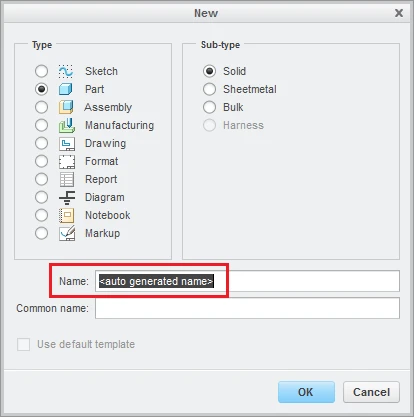
Creo New File.png


Bad:

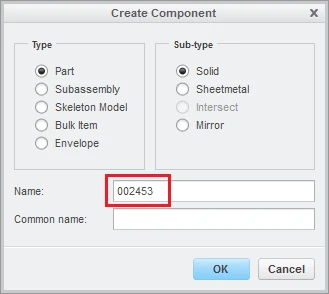
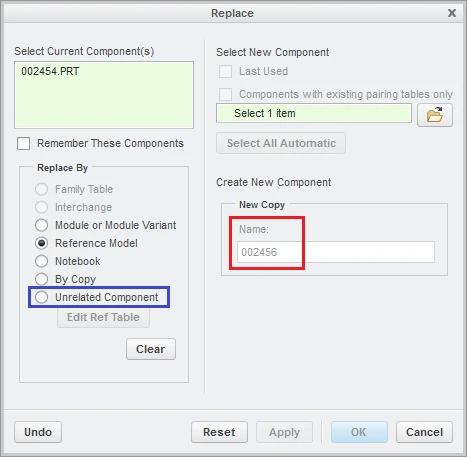
This falls apart everywhere else.  All of these other actions will pull a number from the database as soon as the dialog is opened:

  • Save As from Creo
  • Assembly - Create New Object
  • Assembly - Replace (even though "Unrelated Component" is not selected)
  • Rename from the embedded browser in Creo
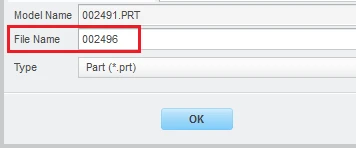
Creo Save As2.png

Creo Assembly - Create New File.png

Creo Assembly - Replace File.png


Wasting a number every time one of these other actions is taken is making the whole thing unusable (at least for us.)  Yes, it functions, but it's not acceptable to "waste" 80% of the available numbers.


Note:  There was a previous product idea but it was 'Archived' due to its age.  Unfortunately this problem still exists so this idea was created to replace it (and at the direction of the Community management.)

29 replies

Jun 22, 2023 8:39 AM UTC

Creo 10 is now released, but there is still no solution for the number consumption? 

Jun 22, 2023 3:58 PM UTC

We did add a letter before our 7 digit part numbers like A134567, but we are burning through so many numbers. Every time you use the New CAD Doc icon in your Windchill workspace pops up (GENERATED) pulls a number.


So even if I want to use my own number for testing like "TEST1345" I already burned a number just opening the user interface.

Jun 23, 2023 6:22 AM UTC

Or add a row in a family table, or copy an item, or rename something.....

Nov 27, 2023 10:18 AM UTC

We are transitioning from Creo Elements/Direct to Creo Parametric
We are going to do a lot of save as copy's.
In below example I only want a copy of the top level. but Creo already wasted free numbers for all underlying components.
We are burning through numbers this way.

Gerard_Moba_0-1701080093586.png


Dec 7, 2023 8:36 AM UTC

This is a test on the test server where I am the only one who is using the server.

I have a Creo Elements assembly (21005030) with 274 unique models/assembly’s.

Gerard_Moba_0-1701937900726.png


If I expand the structure of the assembly there are 1900 objects in it. (each share is counted)

Gerard_Moba_1-1701937900726.png


I open the assembly

Gerard_Moba_2-1701937900726.png


I make a copy of the assembly but I want to keep the number the same.
Notice the generated file number 42882800.


Gerard_Moba_3-1701937900727.png


Gerard_Moba_4-1701937900727.png


In Creo Parametric, the Action for everything under the top assembly is Reuse.

Notice the File Name Generation is Automatic, I can’t set it default on manual.

Gerard_Moba_5-1701937900732.png


I want to save it this way, but this this time I press cancel.

Gerard_Moba_6-1701937900732.png


Now I do the save as action again.

Notice the generated file number 42901930

Gerard_Moba_7-1701937900732.png


At moba there is always a zero at the back of the number.

(42901930 – 42882800)/10 = 1910

That means there are 1910 numbers which are lost to the number generator.
I do not see this as a feature request but as a bug.

TomUAuthor
Jul 2, 2024 3:54 PM UTC

@NihalVelpanur or @ArnaudVandeVeer,

Could we please have an update on the future of this idea?  Thanks.

Feb 20, 2026 7:23 AM UTC

@NihalVelpanur and @ArnaudVandeVeer 

Please could we get some status update on this idea? This is now almost seven years old bug report and it has been "added to the Creo roadmap" almost six years ago with no solution in view.


I just noticed that during the last half year, our ratio of used vs wasted item numbers is at 10% used and 90% wasted! I will now have to instruct our users to just not use Creo Save as at all, because PTC prioritizes fringe features like adding sculpting tools and customizable Manikins to Creo instead of fixing bugs that deteriorate PLM data.

Feb 20, 2026 3:20 PM UTC

Hi @N-Pyn , 


This project is currently under development with plans to release enhancements for specific use cases over the next few releases. We are aiming to target use cases that are most frequently used by users first, and we will continue to cover more scenarios in the future. 


Thanks, 

Jack Egan

Feb 20, 2026 7:12 PM UTC

 @Jack_Egan As mentioned by @N-Pyn, the Save a Copy screen is by far the most used and worst offender.


If this is helpful to PTC, here's the order I would fix:

  1. Save a Copy menu is used very often to copy of a model or export a different file type (ex: STEP, IGES, etc.).
  2. Save a Copy > Assembly menu can easily waste 100's or 1000's of part #'s just by bringing the menu up.
  3. Create Component - This is command is used often but people likely create a component if they enter that menu so the # of wasted numbers is lower.
  4. Rename - We don't usually rename in Creo when working in Windchill. It's more common to rename in Workspace or Commonspace.
  5. Replace