
Feb 5, 2024 1:22 PM UTC
Delivered

Automatically add the date & time for each line in the Message Log

Related products:Creo Parametric

Please include detailed documentation such as screenshots, images or video.

1. What product and version are you running?
Creo 7 until 10 and Creo+


2. What is the problem?
There is no possibility to enable timestamps that show the date and time for each line that appears in the Message Log.

In Windchill Workgroup Manager this is already implemented, so why wouldn't it be possible in Creo Parametric? 🙂
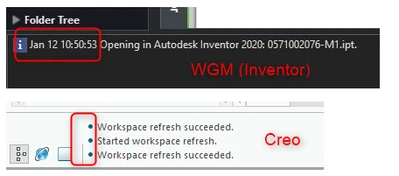
 

RV_10366459_0-1707139325326.png


3. Are you using a workaround? If yes, please describe it.
You can manually make a timestamp appear by right-clicking in the Message Log and select Date and Time, but this needs to be done manually and this is not a reliable method if you want to see how long a certain process of action takes.

4. What is the use case for your organization? Describe how your idea would work in context or how it would apply to a practical situation.
More insight on how long a process/action takes, this allows us to see how much time it takes for a check-in action for example, or for opening a large assembly, … This would be very helpful in diagnosing issues (for example if an assembly takes a long time to open, we could see using the timestamps if most of the time was spent on adding the assembly to the workspace, or opening the workspace, etc...)

5. What impact does this problem currently have on your organization? (Number of users affected, hours of lost productivity, etc.)
It would be very helpful in diagnosing issues to see if certain problems are caused by a poor connection to Windchill, or by the local resources of the computer, etc...

9 replies

Feb 5, 2024 1:25 PM UTC
Status changed to: Acknowledged

Hi @RV_10366459!

Thank you for your idea. Based on the information you provided, we are acknowledging it as the Community management team. This is not a commitment from the Product team. Other users may comment and vote your idea up.

Feb 5, 2024 2:21 PM UTC

From the large assembly management stand point there is a new tool in Creo 11 that is going to report out regeneration times so you can see what is taking the time. The info can be exported out to a csv for analysis.


For time stamping, the trail file includes a start time and then at the end of a command line the last number is the time in milliseconds.

Mar 14, 2024 11:29 AM UTC

Initial trigger for this topic was to make it easier to keep track of Windchill actions, rather than timing regeneration times.

If you have multiple parts open in Creo, Windchill action status messages are spread out over all of them, which makes it difficult to track.
Also, for me it would make more sense to have Windchill specific messages in the Windchill browser instead of in the Creo windows.
As it is in the Windchill Workgroup Manager.

Mar 14, 2024 4:08 PM UTC

Implementation proposal for smallest/no visual impact on Creo GUI/UX:

  • optional output of a time stamp prefix to the message log (config.pro option, might be hidden)
  • it would be enough to have the timestamps in the dedicated "Message Log..." dialog (right click on message area) and invisible in the standard message area

config.pro option proposal:

message_lines_timestamp_show=no|always|log

Mar 15, 2024 8:10 AM UTC

@HannesBuxbaum 
Sounds like a good proposal. I hope I understood correct and you mean this:

- option "always": timestamp appears in the standard message area
- option "log": timestamp not visible in message area, but visible in the separate Message log.
I'd prefer the timestamp to be visible in the standard message area, without having to click open the Message log.
There's already enough clicking to be done in Creo, and the timestamp doesn't take that much space.

So if the "log" option is too difficult to create (it would be a different text than in the message area), I would drop that option and only keep the "always".

Mar 15, 2024 1:39 PM UTC

The timestamp options should either be always or no. 

What is being displayed in the message window is the same information being written to the message log file.

Please do not make it more complicated by having the message window display different information than what is being written to the message log file. This will be a nightmare to control as it would it now require 2 files to be created, one a message window log and two a message log file.

As a system admin I would probably set the option to NO in config.sup.

With that said, leave the current time stamping as is even when set to no.

Mar 15, 2024 3:35 PM UTC

@DieterS_80 

With "always" I meant to see the timestamp in every forms/locations of the messages (message area, message log dialog, message log file, ...)

@BenLoosli 

1) The PTC Creo programmer want the minimum complexity and implementation/documentation/maintenance efforts. Therefore "hidden config.pro".
2) Most of the users (>95%) do not need the timestamp and prefer a clean UI (it is easy to add bells and whistles everywhere, harder to keep the GUI useable)
3) Some users could benefit from message timestamps (diagnostics).
Sometimes, the same Creo is being used by the users in 2) (engineer) and 3) (the admin doing diagnostics).
For this case, the mixed option "log" would preserve a clean UI while having timestamps when needed.

I agree, having just "no" as default and "always" as option would be great and better than nothing now.

Mar 27, 2024 8:28 AM UTC

Timestamps can be added to messages in the Message Log starting from Creo 11, so this Product Idea may be closed.


RV_10366459_0-1711528095607.png


olivierlp
Community Manager
Jun 3, 2024 4:19 PM UTC
Status changed to: Delivered

Thanks @RV_10366459 for the idea and pointing out the outcome in CREO 11. Also thank you to all commentators and voters!

Olivier