
Mar 6, 2015 2:51 PM UTC
Alternate Solution

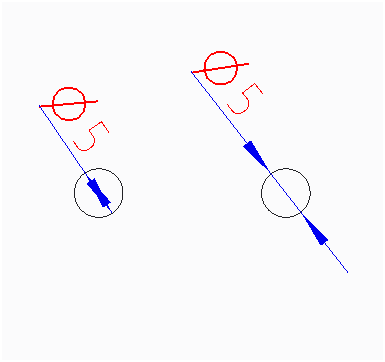
Automatic flipping diameter dimension arrows in drawing views.

Related products:Creo Parametric

While showing or creating diameter dimension in drawing view, diameter dimension arrows should automatic flip outside of circle if the arrows does not fit inside the circle.
7 replies

Mar 6, 2015 5:26 PM UTC

You may want to vote on your own idea....

Mar 30, 2015 10:52 AM UTC

Just for those who might not be aware, you can quickly flip dimension arrows by tapping the right mouse button (RMB) while you're dragging the dimension by holding the LMB.

Might help a few people out while we're waiting for this to be implemented...

Apr 9, 2015 1:37 PM UTC

I would prefer to implement functionality which mentioned Jonathan above - using RMB to flip arrows just during creating dimension in Creo 3.0. Because there is a ghost image of creating dimension and you are able to decide about direction of arrows:

rmb_flip_arrow_creating_C3.png

It would be solution for all dimension types.

(I don't create own idea, it is the same problem)

Apr 10, 2015 6:27 AM UTC

IMHO to implement RMB click to Flip Arrows "on the fly" can be done the best as a second command in the menu with Double Value

Jan 10, 2018 2:06 PM UTC

It would be best for the default to be a single arrow to the outside of the circle.  The diameter symbol makes the second arrow moot.

Jun 14, 2018 6:25 PM UTC
Status changed to: Acknowledged
Jun 28, 2020 1:40 PM UTC
Status changed to: Alternate Solution

Updating the status to Alternate solution. The Mini Toolbar was introduced with Creo 5.0 and it is possible to quickly flip the arrows side from there