
Attach Datum Feature Symbol (DFS) to a leader line directed to a surface in Creo Parametric
1. Describe the Problem
I would like to be able to create a datum feature symbol (DFS) attached to a leader line directed to a surface in Creo, according to ISO standard 5459:2011. This DFS would not be related or attached to a dimension and would be terminating in a filled circle (see figure c in attached image) or in an open circle when the surface involved is hidden (see figure d in attached image).
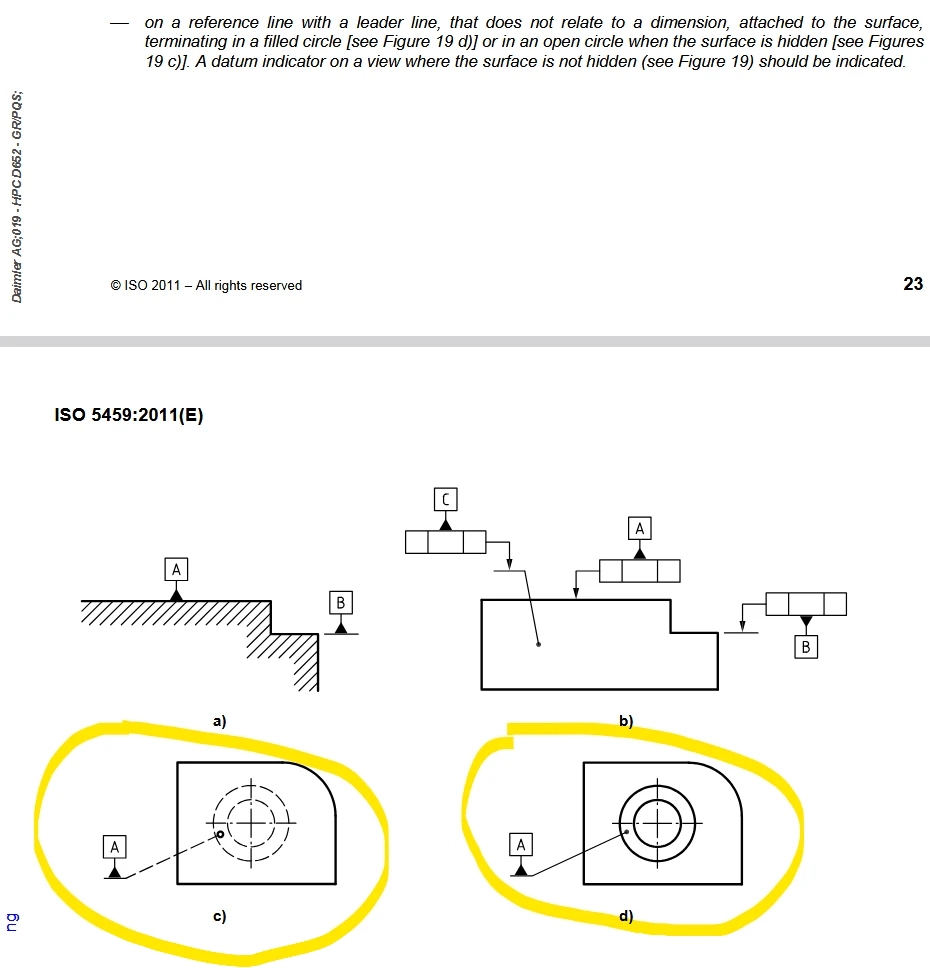
This issue has been identified in the article CS332341.
2. Are you using a workaround?
We are currently using the traditional DFS feature attaching it to the surface but it does not allow us to clearly show the area we want to refer to. Therefore, we are placing the DFS visually around the area that is defined.
3. What is the use case for your organization?
We would like to use this way of defining DFS to be able to define one on a specific area on a huge surface that can't be defined by only one DFS. That way, we are defining cosmetic sketches of the area we want to refer to with the DFS and then define a DFS attached to this surface using a a leader line directed to this specific surface.
4. What impact does this problem currently have on your organization?
It creates vagueness in the definition of our 3D or 2D drawings. This can create misunderstandings during the manufacturing processes; to avoid that it needs to be clarified through added notes in the 3D model or in the 2D drawings.