
Archived
Allow us to position an on a workplane imported 2D geometry directly at the desired location
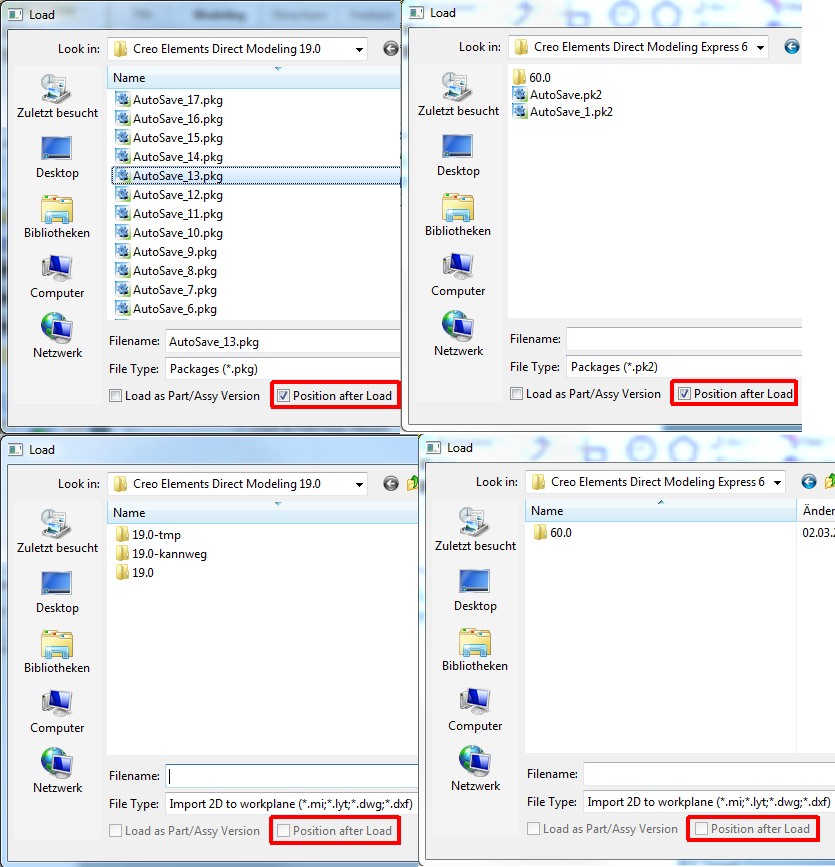
If you load a pkt or pk2 you have the possibility to select the desired position of the part in the Model.
Simply check/uncheck "Position after Load".
When "importing 2D to work plan" that is not (yet  ) possible.
The Geometry is loaded allways with her 0,0 point to the 0,0 point of the workplane.
It would be handy if you load for exemple your 2D geometry tools from your personal database and they could be positioned directly to the desired location.
Like it is possible in Drafting. There the Default is to select a position for the loaded Geometry or you load with the supplementary option Absolute then 0,0 goes to 0,0