
Jun 24, 2025 12:31 PM UTC
Acknowledged

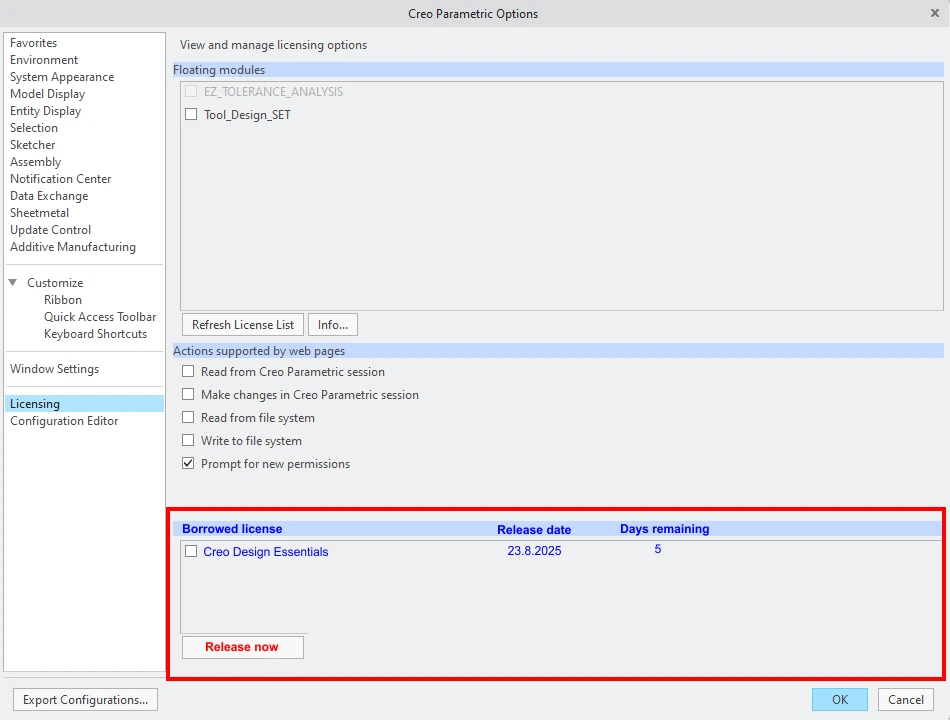
Allow to return borrowed license from Creo

Related products:Creo Parametric

1. Describe the Problem

Implement an option to immediately release borrowed license under Creo menu "File/Options/License" as is on my attached picture.


2. Are you using a workaround?
Manually running command prompt and looking for the correct values = pain for common users

3. What is the use case for your organization?
Users are forced to use command prompt which is complicated and not user friendly. For many of them is not easy to properly input all details into: "lmutil lmborrow -return -c 7788@licenceservername PROE_license_name"

4. What impact does this problem currently have on your organization?
We need to avoid problems during license borrowing.
Catalina_0-1750775004443.png


2 replies

Community Manager
Jun 24, 2025 2:23 PM UTC
Status changed to: Acknowledged

Thank you @PetrP for your idea. Based on the information you provided, we are acknowledging it as the Community management team. This is not a commitment from the Product team. Other users may comment and vote your idea up.

Jun 24, 2025 4:53 PM UTC

Borrowing also has a problem it borrows any licenses used during that session of Creo (ex: if you used a floating license of Creo Simulate but didn't mean to borrow it). The batch file we use to borrow a Creo licenses immediately runs a trail file to close Creo to avoiding accidentally borrowing other licenses. Maybe PTC could create a way to only borrow licenses from the PSF file during startup and not the rest of the session.