
Allow selection of the internal axis of a Round feature when constraining a part in assembly
1. Describe your environment: What is your industry? What is your role in your organization? Describe your stakeholders.
All engineers using Creo Parametric
2. What version of Creo Parametric are you currently running?
Creo 6.0.x.0 until Creo 9.0.x.0
3. Describe the problem you are trying to solve. Please include detailed documentation such as screenshots, images or video.
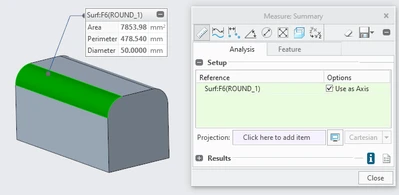
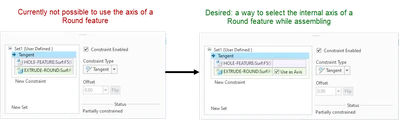
When assembling a component in an assembly, it is currently not possible to select the (internal) axis of a Round feature. In some other features it is possible to do this, for example when using the Measure tool you can use the internal axis of a Round feature by selecting "Use as Axis".
However, a similar option does not exist while assembling a component in an assembly
Something like this would be ideal:
4. What is the use case for your organization?
Allow the users to more precisely/efficiently assembly a part in an assembly
5. What business value would your suggestion represent for your organization?
More ways to assembly parts in a component -> greater precision/efficiency while designing