
Apr 14, 2023 7:37 AM UTC
Acknowledged

Allow opened parts in session to be inserted into an opened assembly using the Copy-Paste buttons

Related products:Creo Parametric

1. Describe your environment: What is your industry? What is your role in your organization? Describe your stakeholders.

All our clients using Creo Parametric


2. What version of Creo Parametric are you currently running?
Creo Parametric 7.0.x.0 to 10.0.x.0

3. Describe the problem you are trying to solve. Please include detailed documentation such as screenshots, images or video.
At the moment the primary way to assemble a component in an assembly is by using the Assemble button.

What I wish to request is an alternative way that enables faster assembling of components (who are opened in session) into an assembly (that is also opened in session) by making use of the existing copy paste buttons:
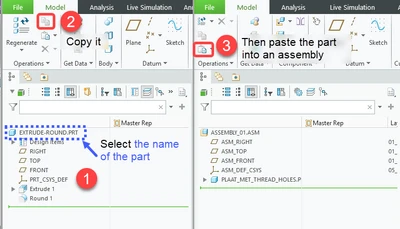
 

Robrecht_0-1681455746597.png

Of course after pasting the part into the assembly, you would then need to define the constraints (similar to when you're using the Assemble button after choosing a component in the File Open dialog window)

Unfortunately, the method described above is not yet possible.


4. What is the use case for your organization?
Increased productivity

5. What business value would your suggestion represent for your organization?
Increased productivity

5 replies

Apr 14, 2023 1:33 PM UTC

Is that really faster than the current method where you can assemble any part that is already in session into your current assembly? The 'hard part' of inserting a component is the constraints, not putting the component in the assembly.

Apr 14, 2023 4:28 PM UTC

@BenLoosli  While I agree than in most cases the hard part (more time consuming) is assembling using constraints (using bottom-up methology), there are cases where we might want to assemble the parts assembled by default (for top-down methology). And in these regard, when we need to repetively assemble parts that are already opened, this would allow a speed improvement.

Apr 17, 2023 12:17 AM UTC

I think this is a pretty good suggestion which would eliminate the need to "specify" the name of the already opened model that is to be brought into an assembly.  Note that software already allows copy+paste of (already assembled) components.


The existing work-around is to remember (part of) the name and then type it into the "quick search" box in the top right corner of file-open dialog box that opens when the "Assemble" function is launched.

Sometimes it is more tedious - for example, the object is not in the same folder; also, if it is a new object, then one first has to switch the file-open to look for "objects in session".


So this would be a "nice to have" shortcut that would make the software more compatible with modern user-experience expectations.

Note that Solidworks allows you to drag-and-drop the top node of the assembly / part and drag it into the window of another assembly as a component, but recall not liking that method as it seemed to require me to juggle opened windows around to make it happen.

Apr 18, 2023 6:41 AM UTC
Status changed to: Acknowledged

Hi @RobrechtSavaco!

Thank you for your idea. Based on the information you provided, we are acknowledging it as the Community management team. This is not a commitment from the Product team. Other users may comment and vote your idea up.

Oct 3, 2023 2:06 PM UTC

A few of our users have asked for this. We came from using Catia V6, which had many faults but the copy / paste components was a real time saver.