
Allow column settings to be saved in Simplified Rep dialog box
1. Describe the Problem
I'm bringing this idea back to life! Previous idea - https://community.ptc.com/t5/Creo-Parametric-Ideas/Allow-column-settings-to-be-saved-in-Simplified-Rep-dialog-box/idi-p/454844
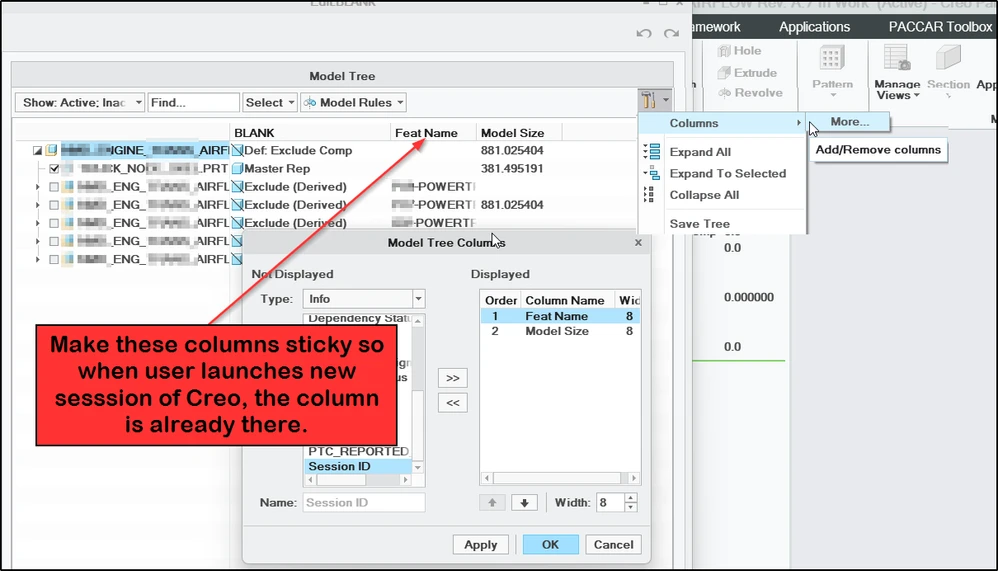
The entire Creo Parametric interface has been updated to make settings sticky for the users with the tree.cfg being obsoleted. The columns in the simplified rep ui have yet to be included. Please vote for this idea to get the columns to be sticky after the user applies it.
2. Are you using a workaround?
A mapkey can be created to enable the user to turn on the column but this works very flaky because the mapkey can only randomly select the row in the model tree columns. You can see in my picture above that if I run the mapkyey twice, it added "model size" which don't want! and the user has to remember to run this every time Creo is launched or use 6 button clicks to turn it on.
3. What is the use case for your organization?
Navigation of our large assemblies benefits from having feature name column included.(It's almost required). We need a way to have this column shown at all times whenever a user is navigating an assembly tree. We have configured Windchill structure tab to have this column along with Creo View in addition to the main window of Creo Parametric. I'm sure many customers have similar use case for columns to be included for navigation.
4. What impact does this problem currently have on your organization?
Difficult to navigate and find the correct assembly or part without the information in the column shown. It's 6 button clicks to make the user do this every time (or use mapkey everytime).