
May 29, 2020 6:12 PM UTC
Archived

Alignment of multi line dimension text

Related products:Creo Parametric

In  Creo 4.0, when placing dimension with 2 or more lines of text, the vertical center of the text is not snapped to the vertical placement. Usually, the center of the "number" (what ever line number it is on) is the "center" of the dimension placement. If you look at the "11.000 REF" it is centered left to right, but the "9.500 REF" is centered on the "9.500", not the center of the "9.500 REF" text space.
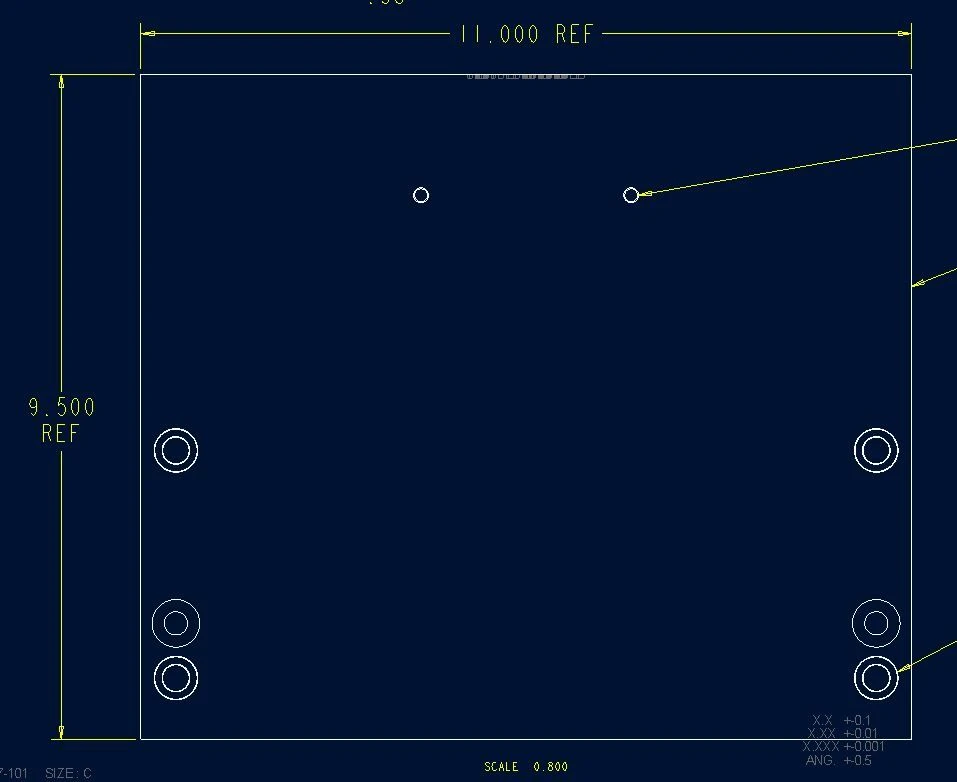
 

alignment.JPG

2 replies

Mar 30, 2021 6:17 PM UTC

Has this been address in any later versions of Creo?

olivierlp
Community Manager
Jul 1, 2024 12:08 PM UTC
Status changed to: Archived

Hello,

We are archiving your idea as part of a general review. This action is based on the age of your idea and the total number of votes received, as per this announcement.

You can always post a new idea with all the details required in the form.

Thank you for your participation.

Olivier