
Add size tolerance to Hole Feature's standard hole notes
1. Describe the Problem
We would like the ability to add size tolerances to the notes generated by the Hole feature when applying standard hole types. Per ASME Y14.5 Specification for Dimensioning and Tolerancing, features of size must include a tolerance. For example, a counter-bored clearance hole for a 1/4"-20 fastener must include tolerances on both diameters but we can currently only produce variations of the following note:
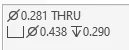
According to the spec, we need to provide a note similar to this:
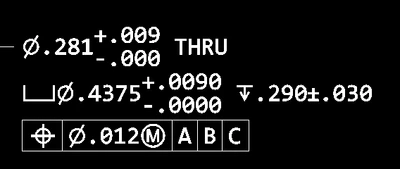
Notice how each dimension has a tolerance, there are no zeros before the decimal places, and a geometric tolerance is attached.
2. Are you using a workaround?
A work around is available by following these steps:
- Create desired hole using Creo's Hole Feature
- Select "OK" to apply the hole and exit the Hole feature
- Right-Click the hole feature in the model tree and select "Edit Dimensions"
- Add tolerances to each of the hole's dimensions
- Gather each dimension's respective d#
- Show the standard hole's diameter dimension using "Show Annotations" (Ø.281 in example above)
- Select the Ø.281 dimension and select "Dimension Text"
- Insert all the necessary d#s (also p#s for patterns). For the example at hand, enter as shown below:
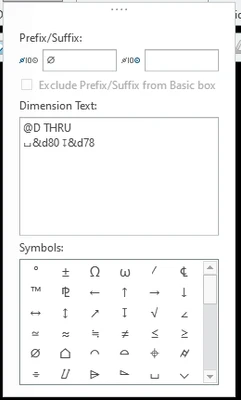
9. Attach a Geometric Tolerance from the annotations tab
NOTE: GD&T Advisor also provides for another workaround but does not work properly with hole patterns created by the "Sketched" type. GD&T Advisor doesn't recognize the pattern or hole feature when using "Sketched" type.
3. What is the use case for your organization?
We would use this fix for all standard type holes, including tapped, drilled, and clearance. I've seen this idea requested a few times but they have all been archived due to not providing enough information. Hopefully I have supplied enough.
4. What impact does this problem currently have on your organization?
This problem utilizes significant amounts of time for each design that could be much more efficient. It also leads to many mistakes from typos, error to include dimensions, and has to be re-done each time a hole's features are changed (add/remove countersink, counter-bore, etc.). It also requires a bit of a learning curve to complete the workaround, leading to repetitive issues by new employees. Essentially, the Hole Feature's Note generator is useless if any drawing must conform to the ASME Y14.5 specification.