Oct 25, 2015 5:00 PM UTC
Archived

Add markers and numbering to notes in Creo 3.0

Related products:Creo Parametric

Hi everybody!

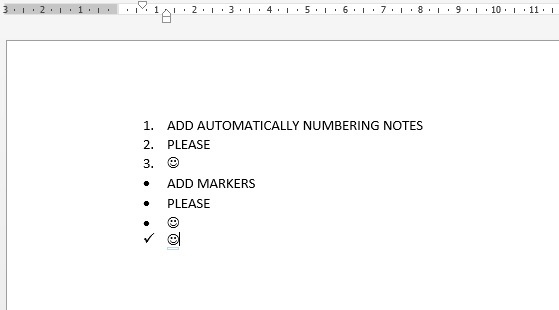
Now when you work with notes in drawings (Creo 2.0 and 3.0) you don't have possibility to add markers or numbering automatically in text. Of course you can add it manually but it so inconvenient.

I think it will be cool if PTC add automatically markers and numbering into notes like in Microsoft Word (when you pushed enter -> next marker or next number).

Markers and numbering.jpg

4 replies

Aug 8, 2016 5:53 PM UTC

I'm surprised this has so few votes.

I'd like to also add Tabulation.

1.  A note that is long enough to require the word wrap should

      look like this.

2. Note 2.   

     a. A sub note should be tabbed in.

Apr 9, 2018 3:37 PM UTC

Agreed!


"I'd like to also add Tabulation.


1.  A note that is long enough to require the word wrap should

      look like this.

2. Note 2.   

     a. A sub note should be tabbed in."

Apr 9, 2018 4:47 PM UTC

Low count might be because this is a limited enhancement to the way PTC handles notes. It should be done as part of an overhaul to the whole note creation/editing process and design.


olivierlp
Community Manager
Jan 4, 2022 4:18 PM UTC
Status changed to: Archived

Hello,

We are archiving your idea as part of a general review. This action is based on the age of your idea and the total number of votes received, as per this announcement.

You can always post a new idea with all the details required in the form.

Thank you for your participation.

Olivier