
Oct 26, 2021 2:26 PM UTC
Archived

Add in config.pro option "Lock Scale" item on Sketch > Modify Dimensions

Related products:Creo Parametric

Hello,

The addition of a config.pro option "Lock Scale" on Sketch > Modify Dimensions would be an important enhancement on display cross sections.
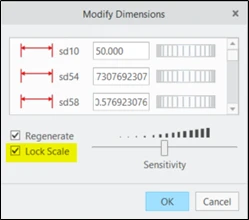
luisPEREIRA_1-1635258406580.png

Thank you

Regards

Luis

6 replies

Nov 9, 2021 1:44 PM UTC

I appreciate both "regenerate" and "lock scale" controls by config.pro

By the way, Siemens has an explicit option to scale the sketch. 

Nov 9, 2021 2:12 PM UTC

@SergejH  Creo has an explicit scale option for sketches (scale/rotate/move)


StephenWilliams_0-1636467132485.png


Nov 11, 2021 9:09 AM UTC

@StephenW thanks for this point, it could be an alternate way to resize an sketch before dimension modification, my reference to Siemens meant that when changing a dimension there is an option to freeze the sketch scale, but at the end this function is adequate to "modify dimension", only it will started on default. 


Dec 6, 2022 2:14 PM UTC
Status changed to: Acknowledged
Mar 30, 2024 10:17 PM UTC

Hi,

config option was added in creo9, and it do what you want: sketcher_auto_scale_dimensions

AndrewK
Community Manager
Jan 5, 2026 3:53 PM UTC
Status changed to: Archived

Hello,

We are archiving your idea as part of a general review. This action is based on the age of your idea and the total number of votes received, as per this announcement.

You can always post a new idea with all the details required in the form.

Thank you for your participation.