
Apr 12, 2021 6:40 PM UTC
Archived

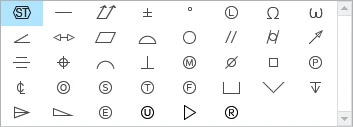
Add common Characters to text input such as "less than or equal to" or "greater than or equal to"

Related products:Creo Parametric

We should not have to enter alt codes which are non-intuitive, must be memorized (or slow), and unstable (often font dependent):

  • ≤ "less than or equal to"
  • ≥ "greater than or equal to"
  • And less commonly:
    • ≠ "Not equal to"  
    • ≈ "Approximately"
    • Greek Letters
    • Perhaps a good way to handle this is by opening MS Word and looking at the symbols used there and how they are organized and mimic use that as your starting point.
  • Folks, please add whatever characters to the comments below that you would like to see that I haven't mentioned here.


Add Here in Creo.  Could even have extended menu options.
lscheeler_0-1618242873338.png


9 replies

Apr 12, 2021 7:06 PM UTC

Are we talking about font.fnt or TrueType fonts?

ALL characters are font dependent, so we need to determine which font(s) PTC will drive us to use in the future.

We have switched from font.fnt to isofont.fnt because it handles the differences between 'l' (lower L) and 'I' (upper I) and '1' (one) as well as between  '0' (zero) and 'O' (upper O).


Maybe this an area that all CAD vendors could fund and develop a universal CAD drafting TrueType font that could be used by NX, CATIA, Creo, AutoCAD and others.

LawrenceSAuthor
Apr 12, 2021 7:50 PM UTC

@BenLoosli, I think that it is a brilliant idea for CAD vendors to unite (if that is even possible!) to create a standard.  However, I don't think that this necessarily relates to this idea.  This idea is simply about extending the extra characters that are used in Creo.  As I understand it PTC made these special characters somewhat font independent.  If I am mistaken on this please correct me with details to help me understand how.

Apr 12, 2021 8:20 PM UTC

All of the font files (*.fnt) are custom files created by PTC and only useable in Creo. Any characters in these files is dependent on what PTC put in the files. The issue you get with 'special' characters is what keystroke do you use to 'call' that character from the font file?

I think the direction that PTC is headed is to do away with these out-dated font files and utilize 'industry standard' TrueType font files that are also used by Microsoft applications.


LawrenceSAuthor
Apr 12, 2021 11:50 PM UTC

I am not sure what that implies.  Are you saying that these special symbols will then take care of themselves in the TTF and OTF fonts and we will be able to use them as TTF/OTF?  Or are you saying because they are going to TTF/OTF that this will be a hinderance?

Apr 13, 2021 1:08 AM UTC

I think we need PTC to chime in here and gives us a direction on where they are going with fonts and how much longer they will be supporting the font, isofont and other *.fnt files. If you look at a .src file for a font, you will see it is basically gerber pen commands of Up, Down and Move. Most of the .src files where created over 25 years ago.

Any font file used will need some alt-<char> to get a symbol as most symbols are not on a standard keyboard. There is no 'equal or less than' or 'equal or greater than' key, etc.

True Type fonts are not much different, someone had to design the character and give it an identifying character, wither a key or a special alt-<char> to find the information in the file.

LawrenceSAuthor
Apr 19, 2021 3:07 PM UTC

@PTCModerator, can you help get us connected to the correct PTC person?

Thanks! Lawrence

Apr 19, 2021 3:34 PM UTC
Community Manager
Feb 20, 2025 12:10 PM UTC
Status changed to: Acknowledged

Hello,

Thank you for your idea. Based on the details and popularity of your idea, we are acknowledging it as the Community management team. This is not a commitment from the Product team.

olivierlp
Community Manager
Jul 3, 2025 3:45 PM UTC
Status changed to: Archived

Hello,

We are archiving your idea as part of a general review. This action is based on the age of your idea and the total number of votes received, as per this announcement.

You can always post a new idea with all the details required in the form.

Thank you for your participation.

Olivier