
Add Column Width setting to Layer Tree so that it's possible to store the width of the Layer Tree
1. Describe your environment: What is your industry? What is your role in your organization? Describe your stakeholders.
All our users using Creo Parametric
2. What version of Creo Parametric are you currently running?
Creo Parametric 6.0.x.0 to 9.0.x.0
3. Describe the problem you are trying to solve. Please include detailed documentation such as screenshots, images or video.
Issue: When Creo has been docked to the right side of the Creo window and you make the layer tree wider, the width will automatically be reset the next time your restart Creo Parametric.
To reproduce this:
1. Move the layertree away from the modeltree to the right side of the Creo window and dock it to the right side
2. Make the layertree wider (by dragging the left side border of the Layer Tree)
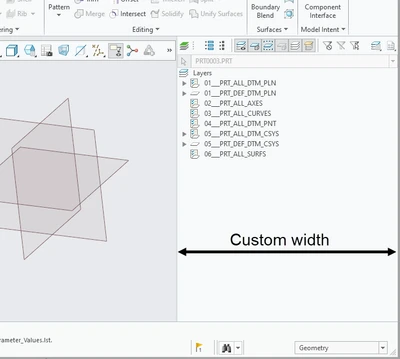
3. Restart Creo, you'll see that after restarting (and opening/creating a part/assembly) that the width of the Layer Tree has been reset to a smaller width
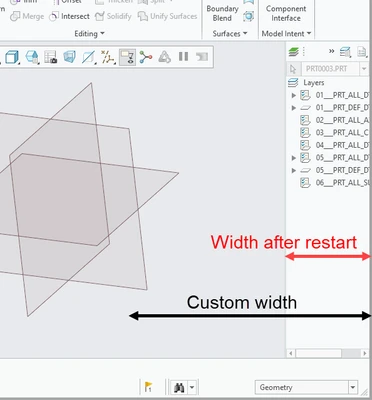
I created a case for this and an SPR was also created and the conclusion was that
A. There were no plans to fix this
B. This is not (yet) possible because the Layer Tree does not have a Column Width setting.
So my proposal would be to add a Column Width setting to the Layer Tree so that the custom width of a Layer Tree can be kept upon restarting Creo.
4. What is the use case for your organization?
Improving the user experience
5. What business value would your suggestion represent for your organization?
Improvement of the ease-of-use of Creo