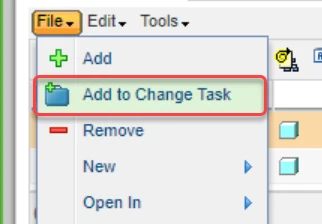
Add additional Database Operation: Add to change task, Revise and Check out
Please include detailed documentation such as screenshots, images or video.
1. What version of the software are you running?
7.0.2
2. What is the problem?
In Creo 3D itself, a user has no option to add objects to a change task, while the option is available in the workspace itself. Means if a user wants to modify an approved object in 3D, he always needs to switch to workspace in order to add it to a change task, or he uses Revise and Check out, which leads then to additional effort in the end to gather all the revised objects before completing the Change Task.
My idea would be to add an additional button called "Add to Change Task, Revise and Check out" which will only show up for approved objects. When a user selects this command, he gets a list of active Change Notices within the CAD Tree which is currently open and has a search functionality as he has today in workspace. When a Change Notice has been selected, the user gets a list of all the Change Tasks within that Change Notice and can select one. After selecting the Change Task, the initially selected object is added to the Affected Objects Table, and is revised, with the new revision automatically added to the Resulting Objects Table. The new revision is then automatically added to the workspace and active in 3D (same as Revise and Check-Out does today).
3. Are you using a workaround? If yes, please describe it.
Workaround is manual user interaction, which is very time consuming.
4. What is the use case for your organization? Describe how your idea would work in context or how it would apply to a practical situation.
Whenever a user is assigned a Change Task and recognizes certain objects where not initially revised, he can easily add them to the already existing Change Task, without needing to perform several steps as today. Workflow today is:
a) Leave 3D, go to Windchill, Edit the change task, Search for the objects, add the object to Affected Objects Table, Revise Object, add revised object to Workspace, continue working in 3D.
b) Revise and Check out in 3D, switch to workspace, look for the revised object, add to Change Task, look for Change Notice (typically switch to Windchill Change Taks, check the Change Notice Number), add to Resulting Objects of Change Notice (without adding old revision to Affected Objects Table, as this would mean additional extra effort).
5. What impact does this problem currently have on your organization? (Number of users affected, hours of lost productivity, etc.)
To add objects to a change task, costs easily a minute currently, what could be reduced to some seconds. Over the year our organization would safe several hours in productivity. And also the work methodology of Change Tasks would be deeper integrated into the tool, which helps users to follow the methodology of Plan Do Check Act and not needing to put some extra effort in order to work according to processes.