
Sep 5, 2025 7:30 AM UTC
Archived

add ability to create group within quilts, bodies and the other elements in "Design items"

Related products:Creo Parametric

1. Describe the Problem

if there are many surfaces generating quilts in the model after while it is hard to manage and it will be fantastic to group some of them to squize them 
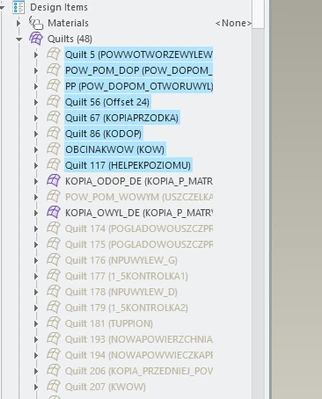
rsobecki_0-1757057260223.png


if possible do this also for other elements in DESIGN ITEMS like about: bodies and materials


2. Are you using a workaround?
no way at all

3. What is the use case for your organization?
nothing

4. What impact does this problem currently have on your organization?
none


Status changed to: Archived 2026-07-06

We are archiving this idea as part of a general review. This action is based on the age of your idea and the total number of votes received, as per this announcement.

You can always post a new idea with all the details required in the form.

Thank you for your participation.

This topic has been closed for replies.

7 replies

Community Manager
Sep 5, 2025 11:19 AM UTC
Status changed to: Clarification Needed

Thank you @rsobecki for publishing your idea. However, we need more information as specified in the form you saw in the submission process. You may simply add a comment to your idea. Providing more information on your issue and the usability of your enhancement request would be helpful. Think about ways to educate and convince other Community members to support your idea and present your case to the product management team for consideration.

Please let us know within the next two weeks.

Bets regards,

Catalina 

rsobeckiAuthor
Sep 5, 2025 6:56 PM UTC

It should be clear in my opinion what is missing?


BR

Roman

Sep 5, 2025 7:48 PM UTC

If you move the entities to "Custom" design items, I think you can achieve what you are asking for.

The "Custom groups" are even a tree like structure, you can nest them, create a group inside a group, and move quilts ot bodies to those custom groups.


What I would like to be improved, is the ability to have an user defined order on the default quils or bodies. Sort by name, currently the order is a little bit random.

rsobeckiAuthor
Sep 5, 2025 7:56 PM UTC

Thanks S_Edgenear for your feedback I must test this for sure, but my idea is to have ability to group within original QUILTS group

Sep 5, 2025 8:29 PM UTC

I would also prefer to group and organize with original quilts and bodies.

Being able to reorder would also be nice.

rsobeckiAuthor
Sep 8, 2025 6:32 AM UTC

I tested and it is not possible in my case:


Info from Help:
About Custom Groups
Custom groups(


) are created in the Design Items node. In a custom group, you can organize items from the Design Items section (bodies, quilts, annotations, and material) independent of the regeneration sequence of the features. This structure helps in documenting the design intent of a model. You can add multiple custom groups as sub-nodes.
You can create a custom group using the Create Custom Group command, from the following locations:
•On the Model tab, click the Operations list.
•Right-click the file name (top node) of the model.
•Right-click a custom group.
Drag and Drop Items
You can drag and drop items, such as materials, bodies, quilts, or annotations available inside folders. You can drag and drop these items inside, outside, or within the custom groups.


You cannot drag folders , such as, Materials, Bodies, or Quilts that are automatically created in the Model Tree. For example, when you create a quilt, a Quilts folder is automatically created in the Model Tree. When there is only one item available in a folder, when you drag and drop the item, the folder is deleted from the Design Items node.
Community Manager
Sep 8, 2025 1:55 PM UTC
Status changed to: Acknowledged

Thank you @rsobecki for your idea. Based on the information you provided, we are acknowledging it as the Community management team. This is not a commitment from the Product team. Other users may comment and vote your idea up.